Book sizes are extremely important. They not only impact the book’s readability but also the portability, production, and distribution costs. Especially when the competition is against the convenience of eReaders, sizing a book correctly for print can make or break a sale.
Given that consideration, several standard paperback book sizes work for books of different genres. For example, the sizes of books considered best for children’s books may not be suitable at all for self-help books. To clarify any doubts regarding standard book page sizes, let’s understand standard book sizes, trim sizes, and book dimensions in detail.
Whatever your standard book size, we’ll make it print-ready!
Standard size of books for every genre
The table below shows standard book sizes for various genres:
Additionally, the size of books is also determined depending on the type of publication your book is going to be.
Understanding standard trim sizes and their importance
Trim size is the final size of the book after all the unnecessary parts have been cropped and the script is ready to go into production. These are the dimensions your book will physically have after getting printed.
For example, for a lengthy fiction story, the publishers may take a call to publish it in parts with a smaller trim size. Alternatively, the publishers may also select a slightly larger trim size but reduce the font size to accommodate the story into one book.
Consider standard children’s book sizes, for example. The book sizes are larger because it makes it easier and more interactive for them to look at large-sized illustrations and read larger fonts with relative ease.
Trim size is important because it determines the aesthetic of the book. Its size and thickness impact how a book is carried or held, making or breaking a buyer’s decision to get the book. For example, when meant for sale at airports, the trim sizes are kept as compact and lightweight as possible so that travelers can carry them hassle-free.
Trim size is important because it impacts these major aspects of a book:
Reading experience: Book trim sizes determine the reading experience because it is the book size that makes it easy or hard to hold a book and flip its pages. For larger trims and fonts, the book would be easier to read but harder to sell to those who carry it around.
Marketability: A book with a smaller font and lesser margins may become a challenge to read for seniors. To market your book, it is important to consider the target audience before deciding on the trim size depending on the book genre.
Cost: The larger the book, the more paper it needs to get published – which inevitably increases the cost. It is important to select the right trim size to achieve economies of scale with publishing. The ultimate book cost is passed down to the buyer in the form of sale prices.
Book presentation: Larger trim sizes give more space for your story to exist, allowing more flexibility with font selection, blank space, illustrations, and other aspects. On the other hand, it may increase the number of pages required for the story. A good trim size is a balance between making a story presentable and keeping the bulk of the book under control.
Multiple aspects come into consideration when selecting the right trim size. Keep the following points in mind when selecting the trim size:
Word count: For longer stories, select a larger trim size. For shorter stories, a smaller print would do just fine.
Genre: For every genre, the buyers expect a certain standard from the printed book. If it deviates from being too large or short of the standard, it may throw off the reading experience.
Costs: Publication costs, overheads, profit margins, etc., need to be taken into account before deciding your trim size.
In the end, what matters is getting your amazing story published into the world. We hope you have got a brief idea about average book dimensions through this guide. Our expert team at PaperTrue can ensure perfect typesetting for any book size you choose. We also provide other self-publishing services like editing, online book distribution, book marketing, and book cover design. Whether you want to know about the standard book cover size or convert your book into an eBook, we’re here to help.
Keep reading to enhance your knowledge about book publishing!
In the rapidly evolving world of self-publishing, the landscape of book print-on-demand services has undergone a significant transformation in 2025. These services provide on-demand book printing and a wide range of features, including global distribution, advanced design, and marketing tools.
Choosing the right print-on-demand book service can be tricky, as each offers unique benefits for different needs. It’s important for everyone, from new writers to experienced authors and artists, to grasp these services’ distinct features. In this comprehensive guide, we delve into the top 10 best print-on-demand book companies of 2025, examining their features, cost-effectiveness, and ease of use.
Embark on your book journey with high-quality print-on-demand services!
Let’s first take a quick look at what is book print-on-demand and why you should choose print-on-demand book services.
What is print-on-demand and why should you choose it?
Print-on-demand (POD) is a publishing model where books are printed only when an order is placed, eliminating the need for large upfront print runs and inventory storage.
Choosing the print-on-demand book publishing model offers several advantages, particularly for self-publishers and small presses. Firstly, it significantly reduces financial risk since books are printed only as they are sold, eliminating the need for large, costly upfront print runs and inventory storage.
This model also allows for greater flexibility in book publishing; authors can easily update or modify their books without worrying about unsold stock. Finally, it opens up global distribution opportunities, as many print-on-demand book publishing companies have networks that reach worldwide markets, making it easier for authors to reach a broader audience without the logistical challenges of traditional publishing.
Here is the list of the 10 best print-on-demand book companies of 2025:
PaperTrue is a user-friendly platform that simplifies the entire self-publishing process. Authors can effortlessly upload their manuscripts, select customization options for their books, and receive professionally printed copies on demand. This streamlined approach ensures that authors have complete control over their publishing journey, from cover design services to book format services, making it an ideal choice for both seasoned and debut authors.
With PaperTrue’s worldwide distribution network, authors can reach a global audience without the hassle of managing inventory. Overall, PaperTrue empowers authors to bring their literary visions to life with ease, efficiency, and cost-effectiveness, making it one of the top print-on-demand book companies.
Pricing: PaperTrue print-on-demand pricing for a 200-page book starts at US $12
Rating: PaperTrue has a rating of 4.6 out of 5 on Sitejabber.
2. Printify
Printify is one of the best print-on-demand book companies that offers a range of features, uses, and benefits for both authors. Printify’s global network of printing partners ensures high-quality printing and efficient order fulfillment, reducing the hassle of managing inventory and shipping.
For authors and publishers, Printify provides a cost-effective solution to bring their books to market without the need for large upfront investments. Additionally, Printify offers competitive pricing and transparent pricing models, allowing authors to maximize their profits.
Pricing: Printify provides print-on-demand book services through three plans, one of which is free and two are paid plans starting from US $29 per month.
Rating: Printify has a rating of 4.4 out of 5on Shopify App Store.
3. Amazon Kindle Direct Publishing
Amazon’s Kindle Direct Publishing (KDP) platform offers a multitude of features and benefits for authors looking to self-publish their books through Amazon print-on-demand services. Authors can also take advantage of Amazon publishing‘s distribution network, which enables their books to be available on Amazon’s vast marketplace, reaching a global audience.
KDP offers competitive royalty rates, allowing authors to earn a substantial percentage of the book’s sales price. Overall a user-friendly platform, global distribution, and a cost-effective approach make Amazon print-on-demand services one of the most liked book print-on-demand companies.
Pricing: The pricing to print a paperback on Amazon KDP starts from US $2.30 and US $6.80 for a hardcover.
Rating: Amazon Kindle Direct Publishing has a rating of 4.1 stars out of 5 on Amazon.
Blurb is one of the leading print-on-demand book companies renowned for its user-friendly platform and versatile features. Blurb offers high-quality printing services that ensure each book is professionally bound and printed, delivering a polished final product.
Beyond self-publishing, businesses can utilize Blurb to create custom marketing materials, catalogs, and brochures, providing a cost-effective solution for high-quality printed materials. Blurb offers a user-friendly platform, versatile applications, and distribution services, making it a top choice for individuals and businesses.
Pricing: Blurb’s print-on-demand pricing for trade books like novels starts at US $12.03
Rating: Blurb has a rating of 4.4 stars out of 5 on Trustpilot.
5. Lulu
Lulu is a prominent print-on-demand book company that offers a range of features, uses, and benefits to authors and self-publishers. Lulu provides authors with the flexibility to choose from various book formats, including paperback, hardcover, and eBooks, catering to diverse publishing needs. Authors can publish their books at their own pace, eliminating the need for large upfront investments or bulk printing.
This on-demand printing model not only reduces financial risks but also ensures that books are printed only when they are ordered, minimizing inventory costs. The benefits of using Lulu include worldwide distribution through major online retailers, access to professional design and book editing services, and the opportunity to retain creative control and higher royalties.
Pricing: Lulu’s print-on-demand pricing for a 200-page paperback starts at US $6.41 and for a 200-page hardcover it starts at US $14.37
Rating: Lulu has a rating of 4 out of 5 on Trustpilot.
6. IngramSpark
IngramSpark provides authors with a wide selection of printing options, including various trim sizes, paper types, and cover finishes, ensuring that each book can be customized to suit its intended audience. Authors benefit from the platform’s user-friendly interface, which allows for easy file uploads and book customization.
Moreover, the company offers competitive pricing, making it a cost-effective choice for smaller print runs. With its high-quality printing and distribution services, authors can focus on their writing while leaving the production and logistics to IngramSpark. All these distinct features make IngramSpark one of the most reputable print-on-demand book companies.
Pricing: IngramSpark’s print-on-demand book services start from US $7.92
Rating: IngramSpark has a rating of 3.1 out of 5 on Trustpilot.
BookBaby is a renowned print-on-demand book company that offers a range of features, uses, and benefits for authors and publishers. BookBaby provides professional-quality printing, ensuring that each book is produced with precision and attention to detail.
The uses of BookBaby extend beyond just printing books; it also offers distribution services, enabling authors to make their books available to a global audience through major online retailers like Amazon, Barnes & Noble, and more. Authors can also opt for eBook conversion and distribution services, widening their reach in the digital market.
Pricing: To sign up for BookBaby’s book print-on-demand services, a minimum order of 25 books has to be placed. The pricing for a 200-page book starts at around US $17.43 per book.
Rating: BookBaby has a rating of 4.5 out of 5 on Trustpilot.
8. 48 Hour Books
48 Hour Books stands out in the self-publishing sector as a print-on-demand service renowned for its speed and efficiency. Distinctively, the company boasts an impressive turnaround, delivering standard perfect bound books in 48 hours or less. Quality is a key focus for 48 Hour Books, which commits to using superior materials to produce books that are on par with, or surpass, those found in bookstores.
48 Hour Books also provides various upscale printing options that elevate the aesthetic value of the books. Options such as Diamond 3D covers, foil stamping, and hardcover books with dust jackets, along with the choice of cloth and leather covers, offer a touch of sophistication. These customizable features enable authors to personalize their books according to their unique style preferences.
Pricing: To use 48 Hour Books’ print-on-demand book services, a minimum order of 10 books has to be placed. The pricing for a 200-page book starts at around US $18.72 per book.
Rating: 48 Hour Books has a rating of 4.7 out of 5 on Yelp.
9. Draft2Digital
Draft2Digital’s print-on-demand service offers several features and benefits for self-publishing authors. One of its key features is the automated, professional layout for manuscripts. This service allows authors to use automated conversion and layout templates to give their books a professional appearance.
Furthermore, Draft2Digital’s service is notable for its wide distribution network. The company distributes both eBook and paperback books to major retailers online and hundreds of storefronts worldwide. This extensive distribution network allows authors to reach a broad audience with ease.
Pricing: Draft2Digital’s base cost for book printing starts at as low as US $3.88
Rating: Draft2Digital has a rating of 5 on Plottr.
10. DiggyPOD
DiggyPOD’s services are designed to customize the printing process to meet specific requirements, ensuring high-quality results. DiggyPOD provides multiple printing options such as different covers, colors, and paper types, allowing authors to bring their creative visions to life. Their print-on-demand approach enables clients to print the exact number of copies needed, reducing costs and minimizing waste.
The company prides itself on its ability to transform manuscripts into professional-looking books. They offer various binding options like perfect binding, plastic coil binding, and hardcover binding, accommodating different preferences and book types. DiggyPOD’s services extend beyond just printing to include cover design, formatting, and distribution considerations.
Pricing: To avail of DiggyPOD’s book print-on-demand services, a minimum order of 24 books has to be placed. The pricing for this order of 24 books, 200 pages each, starts at US $12.11 per book.
Rating: DiggyPOD has a rating of 4.88 stars out of 5 on Reseller Ratings.
Navigating the dynamic world of print-on-demand book companies in 2024 presents both exciting opportunities and daunting challenges for authors. The top 10 best print-on-demand book companies listed here have been meticulously selected based on their unique strengths and overall contribution to simplifying the self-publishing process.
As experts in self-publishing services and providers of print-on-demand services, we understand the importance of aligning with a company that meets your specific publishing needs. We hope this article will make your choice easier. Happy publishing!
Keep reading our articles for more useful resources:
Welcome to the world of print-on-demand, a game-changer in the realm of book publishing! Gone are the days of large print runs and stockpiling unsold copies in warehouses. With book print-on-demand, books are printed as they are ordered, making it an incredibly efficient and eco-friendly option. Whether you’re an aspiring author, a small publishing house, or just a book enthusiast, understanding how print-on-demand works can open up a world of possibilities.
If you are someone who wants to know how to print a book on demand, you are at the right place. So, let’s dive in and explore what print-on-demand books really mean for the future.
Start your book journey. Get premium print-on-demand services!
What is print-on-demand?
Print-on-demand (POD) is a digital printing technology that allows for books to be printed in small quantities or even one at a time. This method contrasts with traditional bulk printing, where large numbers of books are printed in advance.
Print-on-demand allows publishers and authors to print books on order, reducing storage needs and the risk of excess inventory. This method is ideal for self-published authors, small presses, and niche publications, providing an economical and efficient solution to fulfill reader demand without the costs associated with large print runs.
We hope that what is a print-on-demand book is now clear from the definition of print-on-demand. Now we will look into how does print on demand works.
What is print-on-demand book publishing? It is a streamlined, tech-driven process that prints books only as they are ordered, avoiding large stockpiles. The process includes:
Digital File Creation:Book formatting is done into digital files, including text, graphics, and cover.
Listing on Platforms: These files are uploaded to print-on-demand platforms like Amazon’s Kindle Direct Publishing, where they’re listed for sale.
Customer Order: Orders are received by the print-on-demand service.
Printing:Publishing companies print books on demand using digital technology, suitable for single copies or small batches.
Binding and Quality Check: Print-on-demand hardcover books and paperbacks are bound and subjected to thorough quality checks.
Shipping and Fulfillment: Completed books are shipped to customers or retailers.
Royalties and Reporting: Authors or publishers get sales reports and royalties, calculated as a percentage of the sale price minus printing and handling costs.
Pros and cons of print-on-demand
If you are looking to print books on demand, it is important to know the disadvantages and benefits of the print-on-demand book publishing process.
Pros
Reduced Financial Risk: Print-on-demand eliminates the need for large upfront investments in printing, reducing the financial risks associated with unsold inventory.
No Storage Required: Since books are printed as they are ordered, there’s no need for large storage spaces or dealing with excess stock.
Environmentally Friendly: To print a book on demand is more sustainable, as it reduces paper waste and energy consumption associated with overprinting.
Accessibility for Authors: It provides an accessible platform for self-published authors and small publishers who might not have the resources for large print runs.
Flexibility: Print-on-demand allows for easy updates and revisions of the book without wasting existing printed stock.
Global Distribution: Many print-on-demand book services offer worldwide distribution, making it easier to reach a global audience.
Cons
Higher Per-Unit Cost: Printing individual books or small batches is generally more expensive per unit than bulk printing.
Limited Customization and Quality: There might be limitations in terms of print quality, paper types, and binding options like when one wants a print-on-demand hardcover book, compared to traditional printing.
Longer Delivery Times: As books are printed upon order, the delivery time can be longer than with books that are readily available in stock.
Reduced Profit Margins: The higher print-on-demand cost per book can lead to smaller profit margins for authors and publishers.
Dependence on Service Providers: Quality and speed depend heavily on the print-on-demand service provider, which can vary significantly.
Limited Retail Presence: Books printed on demand might not always be available in physical bookstores, which typically prefer stocking books from traditional bulk print runs.
The cost of print-on-demand books can vary widely based on several factors. Here’s a breakdown of what can influence the price:
Size and page count
Interior type and color
Paper quality
Cover type and design
Binding type
Volume of orders
Print-on-demand service provider
On average, the base cost for printing a standard book-sized 6″x 9″ paperback book through a print-on-demand books service can range from $2 to $5 for a black and white interior with about 150 to 200 pages. Adding color interiors or opting for hardcover binding can push the price higher, potentially over $10 per copy.
Practical tip: Keep in mind, that this cost only covers printing. If you’re selling your book, you’ll need to price it higher than this base cost to cover additional expenses like distribution fees, taxes, and your profit margin.
Print-on-demand vs. traditional printing
Moving away from old ways of publishing and into the world of print-on-demand is exciting. It’s not just about getting creative; it’s also about a smarter, more reader-friendly way to share what you know and the stories you want to tell. With book print-on-demand services, independent authors can easily publish their works without the need for large print runs or substantial upfront costs. In the ever-changing landscape of books and publishing, the power of print is just a click away!
As experts in self-publishing services who provide print-on-demand, we hope our article will make your printing and publishing journey easier!
If you want to know more about publishing, keep on reading our articles.
A lab report documents the theory, methods, and results of your experiment to demonstrate your understanding of research and scientific methodology. In this article, we’ll tell you how to write a lab report with the help of some useful examples.
For many students, writing a lab report can be confusing: how to format it, what to include and not include, and so on. The questions are endless! Just remember that your lab report will allow others to reproduce your results and draw their own conclusions. This will help you write a lab report that’s well-formatted and organized.
In true Resource Center fashion, let’s start with the basics: What exactly is a lab report?
Need help creating a perfect lab report?
What is a lab report?
A laboratory report is a document written to describe and analyze an experiment that addresses a scientific inquiry. A lab report helps you conduct an experiment and then systematically design a conclusion based on your hypothesis.
Note: A lab report is not the same as a lab notebook. A notebook is a detailed log you keep throughout the study. A lab report is a concise summary that you submit after the study is done, usually for a final grade.
A lab report typically follows this format:
Title
Abstract
Introduction
Equipment/Materials
Methods
Results
Discussion
Conclusion
References
This is a broad list of sections you might have to include in your lab report, but by no means is this compulsory or exhaustive. You should always refer to the course or university guidelines to understand the desired format.
How to Write a Lab Report
A lab report should be clear, concise, and well-organized, and it should include all the necessary information for others to replicate your experiment. Since the lab report format is designed to serve this purpose, you must follow it to the bone while writing your report.
Let’s start with learning how to title a lab report.
Title
The title of your lab report should:
Be clear, direct, and informative.
Include keywords that clarify your objectives and involved variables.
Be under ten words (ideally).
It’s a good idea to avoid phrasing the title as a question. Remember, your title doesn’t have to be witty or clever, just descriptive and to the point. Here are a few title examples that can clarify this for you:
Unraveling the genetic code through gel electrophoresis.
Hot and cold: How temperature affects enzymes yeast cells
Impervious alloys of Aluminium
How fast does Hydrogen Peroxide decompose?
The speed of growth: An Analysis of bacterial growth rates in different culture media
Analysis of DNA fragment lengths using gel electrophoresis
The effects of temperature on enzyme activity in yeast cells
Investigating the corrosion resistance of Aluminum alloys
Study of chemical kinetics through the decomposition of Hydrogen Peroxide
Quantifying bacterial growth rates in different culture media
Title page
While it’s not necessary to dedicate an entire page to the title, some universities might ask for a title page. If you’ve been asked to make this, include the following details:
The experiment title
Your name and student details
Course and program details
Date and year of submission
Abstract
An abstract is a brief but comprehensive overview of the purpose, findings, and larger relevance of your experiment. It communicates the essential details of your study to your readers, whether it’s evaluators or peers.
Follow these tips to write a lab report abstract:
Clearly state the topic of your experiment.
Briefly describe the conditions of your study, the variables involved, and the method(s) used to collect data.
Lay out the major findings of your study and your interpretations of them.
Mention the relevance and importance of your study in brief.
An abstract is usually only a page long (typically between 100 and 250 words), so your writing must be concise and crisp.
Bonus tip: Although the abstract is the first section of your report, it’s best to write it toward the end. Much easier to summarize the report after it’s been written!
Lab report abstract example
This experiment aimed to investigate the corrosion resistance of two different aluminum alloys: 6061-T6 and 7075-T6. The experiment involved exposing samples of each alloy to a 3% NaCl solution for a period of 72 hours and then measuring the weight loss of the samples. The results showed that 6061-T6 had a weight loss of 0.10 g, while 7075-T6 had a weight loss of 0.25 g, indicating that 6061-T6 was more corrosion resistant. These findings suggest that the composition of the alloy has a significant impact on its resistance to corrosion. This information is important for industries that use aluminum alloys in environments that are prone to corrosion, such as marine applications or chemical processing. Further research could explore the specific mechanisms that contribute to the corrosion resistance of different aluminum alloys and could investigate the effects of other environmental factors on corrosion.
Introduction
The lab report introduction provides your readers with background information on your experiment and its significance. It should be brief and to the point, so a few paragraphs is the maximum length recommended.
You can adopt either of two modes to write your introduction:
Beginning with the research question and then adding context, ultimately closing with your purpose.
Beginning with the broad topic and narrowing it down to your research question.
Follow these steps to write your lab report introduction:
Begin with a brief overview of the broad research area and existing literature.
Include only essential background information and cite only highly relevant sources.
Clearly define any key terms or concepts that you’ll use in the report.
State the specific purpose and objectives of your experiment.
Mention the relevance and significance of your study.
State a clear hypothesis and expected outcomes.
Check with your instructor about adding the variables, results, and conclusions to the introduction.
Refer to the university guidelines for instructions on labeling paragraphs in your introduction.
Use the past tense when describing the purpose and other specifics of the experiment since it has already been carried out and is in the past. (“This experiment aimed to investigate the corrosion resistance of two different aluminum alloys.”)
Use the present tense when describing the report, existing theories, and established facts. (“This information is important for industries that use aluminum alloys in environments prone to corrosion.”)
Make sure you use your own words rather than following a templatized format.
Lab report introduction example
Aluminum alloys are widely used in a variety of industrial applications due to their excellent strength-to-weight ratio, good corrosion resistance, and other desirable properties. However, the corrosion resistance of aluminum alloys can vary depending on their composition, and understanding the factors that contribute to corrosion resistance is crucial for their effective use in harsh environments. In this experiment, we aim to investigate the corrosion resistance of two different aluminum alloys: 6061-T6 and 7075-T6.
These alloys were selected because they are commonly used in industrial applications and have different compositions, with 6061-T6 containing magnesium and silicon, while 7075-T6 contains zinc and copper. By exposing samples of each alloy to a 3% NaCl solution and measuring the weight loss of the samples over time, we can determine which alloy is more corrosion-resistant and gain insight into the factors that contribute to their corrosion resistance. This information is important for industries that use aluminum alloys in harsh environments, such as marine and aerospace applications, and can contribute to the development of more effective corrosion-resistant materials.
Method
The lab report methods section documents the methods, subjects, materials, and equipment you used to collect data. This is a record of the steps you followed and not the steps as they were prescribed.
Follow these tips to write a lab report method section:
List all materials and equipment used in the experiment, including their material specifications such as weight or amount. (Ex: 5 ml of 3% NaCl solution)
In the case of elaborate lists and sets of steps, you may include them in the appendix section and refer to them in the methods section. (Check this with your instructor!)
Detail the procedures you used to carry out the experiment step-by-step, including apparatus setup, mixing of reagents, and other technical processes.
Explain how you collected and recorded the data as well as the involved analytical methods and calculations.
Use the past tense to write this section.
Discuss the limitations and margins of error and how you tried to minimize them.
Where relevant, mention the safety precautions and protective equipment used during the experiment.
Your methods section should be accurate enough for other researchers to follow the instructions and obtain results similar to yours.
Lab report method example
Materials:
Two aluminum alloy samples: 6061-T6 and 7075-T6
3% NaCl solution
Two beakers
Two stirring rods
Digital scale
Vernier caliper
Procedure:
Cut four aluminum alloy samples, two from each type of alloy, each with dimensions of 1 cm x 1 cm x 0.2 cm.
Clean the samples thoroughly using ethanol to remove any impurities or oils.
Weigh each sample accurately using a digital scale and record the initial weight.
Prepare a 3% NaCl solution by dissolving 30 g of NaCl in 1000 mL of deionized water.
Pour 250 mL of the 3% NaCl solution into each beaker.
Submerge two samples of each aluminum alloy in separate beakers containing the NaCl solution.
Use the stirring rods to stir the solutions gently to ensure uniformity.
Allow the samples to remain in the solutions for 72 hours at room temperature (25°C).
After 72 hours, carefully remove each sample from the solution and rinse with deionized water to remove any remaining salt.
Dry each sample using a lint-free cloth and measure its weight using the digital scale.
Record the final weight of each sample.
Calculate the weight loss of each sample by subtracting the final weight from the initial weight.
Use a Vernier caliper to measure the thickness of each sample, and record these measurements.
Calculate the corrosion rate for each sample by dividing the weight loss by the surface area of the sample and the time of immersion in the solution.
Data Collection:
Weight loss and thickness measurements were recorded for each sample after the 72-hour immersion period. Corrosion rates were calculated using the weight loss, surface area, and time of immersion.
Safety:
The experiment was conducted in a well-ventilated area with appropriate personal protective equipment, including gloves and goggles. Care was taken when handling the NaCl solution to avoid contact with the skin or eyes.
Limitations:
The experiment was conducted under controlled conditions, which may not reflect real-world scenarios. The NaCl solution concentration used may not be representative of all environmental conditions that aluminum alloys may encounter in industrial applications. Further research could explore a wider range of environmental factors to more accurately predict the corrosion resistance of aluminum alloys.
Results
The results section presents the findings of the experiment including the data you have collected and analyzed. In some cases, this section may be combined with the discussion section.
Put your findings into words and present relevant figures, tables, and graphs. You may also include the calculations you used to analyze the data.
Here are some guidelines on how to write a results section:
Begin with a concise summary of your key findings in the form of a brief paragraph or bullet points.
Present the data collected in the form of tables, graphs, or charts.
Describe important data to highlight any patterns you have observed.
Use descriptive statistics such as mean, median, and standard deviation, to summarize your data.
Add your raw data in the Appendices section and refer to it whenever required. Remember to use symbols and units of measurement correctly.
Lab report results example
The aluminum alloys tested have varying degrees of corrosion resistance. Table 1 shows the corrosion rates for each sample, calculated as the percentage weight loss over the duration of the experiment.
Table 1: Corrosion rates for aluminum alloy samples
SampleCorrosion rate (%)
Alloy sample
Corrosion rate
A
0.12
B
0.08
C
0.02
D
0.05
As can be seen from Table 1, sample C had the lowest corrosion rate, indicating the highest resistance to corrosion among the four samples tested. Sample A had the highest corrosion rate, indicating the lowest corrosion resistance.
Figure 1 shows the corrosion morphology of the aluminum alloy samples after exposure to the saltwater solution for 7 days. The images were taken using scanning electron microscopy (SEM).
[Figure 1]
The SEM images show that sample C had the least amount of corrosion, with only small pits visible on the surface. Samples A and B showed more severe corrosion, with visible pitting and cracking. Sample D showed moderate corrosion, with some surface roughening and small pits.
In conclusion, the results of this experiment indicate that the corrosion resistance of aluminum alloys varies depending on the composition of the alloy. Sample C, which had the lowest corrosion rate and the least amount of corrosion morphology, showed the highest resistance to corrosion among the four samples tested. Further research could investigate the effect of different environmental conditions on the corrosion resistance of aluminum alloys.
Discussion
The discussion section of a lab report is where you interpret and analyze the results of your experiment in the context of the research question or hypothesis. This is the most important part of the lab report because this is your contribution to your field of study.
Follow these guidelines to write your discussion section:
Begin with a brief summary of the main findings of the experiment.
Interpret the results and explain how they relate to your research question or hypothesis.
Compare the results to previous research in the field and analyze how they support or oppose existing theories or models.
Discuss any limitations or sources of error in the experiment and how they can be improved upon.
If applicable, include any additional analysis such as post-hoc tests or follow-up experiments.
Your discussion section shouldn’t simply repeat the results but offer a critical interpretation and analysis of them. Furthermore, it should also reflect upon the methods and procedures undertaken and take stock of whether you applied processes most favorable for your subject.
Lab report discussion example
The investigation into the corrosion resistance of aluminum alloys has provided valuable insight into the behavior of these materials under various conditions. The results of the experiment indicated that the aluminum alloys tested had varying degrees of corrosion resistance depending on the specific alloy composition and environmental conditions.
Comparing the results to previous research in the field, the findings are consistent with the general understanding that aluminum alloys are susceptible to corrosion under certain circumstances. However, the exact mechanisms of corrosion and the specific factors that influence corrosion resistance are still subject to ongoing research.
One limitation of the experiment is the relatively short duration of exposure to the corrosive environment. Longer exposure times may have provided additional insights into the behavior of the aluminum alloys over time. Additionally, the use of only one type of corrosive environment may not accurately reflect the behavior of the materials in other environments.
The unexpected finding of pitting corrosion in Alloy B warrants further investigation to determine the underlying causes and potential solutions. Future research could also explore the effects of additional factors, such as temperature and humidity, on the corrosion resistance of aluminum alloys.
Overall, the results of this experiment demonstrate the importance of considering the specific composition and environmental conditions when evaluating the corrosion resistance of aluminum alloys. The findings have implications for the development of more durable and corrosion-resistant materials for various applications in industry and engineering.
Conclusion
The conclusion summarizes the experiment and its significance in your field of study. It’s usually one brief paragraph, and in some cases might be omitted altogether. Check with your instructor about whether or not you need to write a lab report conclusion.
Here’s how to write a lab report conclusion:
State whether the experiment supported or opposed your hypothesis.
Reflect upon the significance and implications of your study.
Suggest avenues for future research.
Lab report conclusion example
The investigation into the corrosion resistance of aluminum alloys demonstrated that the aluminum alloys tested had varying degrees of corrosion resistance, depending on their specific composition and the nature of the corrosive environment. The results of the experiment are consistent with previous research in the field, and the findings support the notion that aluminum alloys are susceptible to corrosion under certain conditions.
The experiment also revealed some unexpected findings, such as the pitting corrosion observed in Alloy B. This finding warrants further investigation to determine the underlying causes and potential solutions.
The experiment was limited by the relatively short exposure time to the corrosive environment and the use of only one type of corrosive environment. Future research could explore the effects of longer exposure times and different corrosive environments on the corrosion resistance of aluminum alloys.
Overall, the results of this experiment provide important insights into the behavior of aluminum alloys and have implications for the development of more durable and corrosion-resistant materials for various applications in industry and engineering.
References
List all the sources you consulted while writing the lab report. Include the full bibliographic information in the appropriate format.
For lab reports in sciences and social sciences, the APA citation style is usually followed. Students of business, fine arts, and history will use Chicago style citations in their lab reports. In the rare event of a lab report under humanities, you’ll be expected to write your citations in MLA format.
Remember that failing to cite your sources is considered plagiarism and has serious consequences. Always give credit where credit is due!
Lab Report Example & Templates
a. Basic Lab report template
b. Chemistry lab report example
c. Example of good labeling
The above examples accurately demonstrate the hallmarks of a good lab report. If you need help to perfect your lab report, you can consider taking our editing and proofreading services. Keep reading to perfect your writing skills!
Do you want the best publishers to take notice of your book? An attractive book proposal will impress publishers and pave the way for faster publication. In this article, we’ve explained the important elements of a book proposal. We’ve also given 7 practical tips to create an engaging book proposal.
Take the first step to publish your book now!
So without wasting time, let’s start with the basics!
What is a book proposal?
A book proposal is a detailed document that authors create to present their book idea to potential publishers. An attractive book proposal helps to persuade publishers of the book’s potential for success.
What to include in a book proposal?
Title page- This consists of the title, subtitle, author’s name, contact information, and date.
Book overview- This includes the book’s title and a summary of what the book is about. The book summary is generally between 200-500 words.
Author bio- A brief account of the author’s background, contact information, experience, and qualifications is included in this section. If you have previously published any books, you can also add them to your bio. An author bio generally ranges from 100-250 words.
Chapter outline- Publishers might ask you to briefly summarize chapters in 2-3 sentences.
Table of contents- This consists of a list of the chapter titles to help the publishers understand the content flow.
Sample chapters- Many publishers ask authors to give 1-5 sample chapters to understand the book’s sellability.
Marketing plan: This is an optional step. You can include any strategies to promote your book. This will help the publisher get clarity about your book.
Target audience- Your book proposal must reflect the potential readers of your book. This refers to your audience’s age, gender, socio-cultural background, interests, and reading background. Touching upon these aspects in your book proposal will help publishers gauge your book’s profitability.
Additional details- You can also add details such as a list of 5 books published on the same topic and how your book stands out. You can also add any illustrations your book has (optional, if required). With this, you can also add your Instagram, Twitter, Facebook, website, and blog links.
Here are 7 tips for writing an attractive book proposal:
Write an engaging title- Your book’s title must reflect your book’s content and themes. Some ways to create an attractive title are: Use alliteration (example: Gone Girl), use vivid language (example: Fury of a Phoenix), use metaphors (example: Invisible Man ), or use a unique character name as the title (example: Frankenstein).
Include a strong hook- While writing the book summary begin with an opening sentence that intrigues readers. You can start with a compelling question, highlight a conflict, mystery, or tough choices that a character must make. Showcase the high stakes and challenges the protagonist must face.
Add endorsements from influencers- If your book has received positive reviews from popular influencers, you can add it to your book proposal. Also, you can give information about any influencers who will be willing to write a foreword or rate your book.
Highlight your book’s USP- A book’s USP (Unique Selling Point) can be the book’s message, writing style, story structure, unexplored topic, interesting twist on a common theme, emotional impact, themes, or message. Highlighting the book’s unique elements through the book summary and chapters can help to secure a good publishing deal.
Mention your platform and reach– If you already have an established audience for your book, mentioning this can strengthen your proposal. Including the number of followers and subscribers on social media, and highlighting your past collaborations and successful promotions can help to successfully pitch your book.
Edit and format your book proposal- Ensure that your book proposal is well-edited. Check the content for grammatical errors, word choice errors, and typos. Make sure that the book proposal format (including the sample chapter file format) is as per the publishing company’s guidelines.
Showcase your book’s relevance- This refers to your opinion about why you think it is the right time for your book to be published. If you think that the book’s story reflects the current trends or fills a gap in the market (an unexplored topic), you can highlight this in your proposal.
Let us see a book proposal example to understand these tips better!
Note: Proposals can vary, depending on the requirements of the literary agent or publisher. This is just a sample book proposal of how Austen could promote her book in 2024.
Book proposal template
This template includes important elements of a book proposal such as the book overview, target audience, marketing and promotion strategies, and more. You can refer to the structure in this template while creating your book proposal.
Now that you know how to write a book proposal, you can begin your publishing journey. For readers wondering about how to write a non-fiction book proposal, these steps remain the same. As experts in self-publishing services, we’d love to perfect your book proposal. We also provide services like creating an author bio, writing a query letter, and an engaging book summary. Feel free to reach out to get your book proposal refined by experts!
Here are some other articles you might find useful:
In the world of publishing, the presentation of a book is just as crucial as its content. This is where book formatting software steps in, bridging the gap between raw manuscript and polished work. They provide many features, from basic text layout to intricate design elements, ensuring that a book is readable and visually appealing.
This article delves into the 10 best book formatting software of 2024, examining their features, usability, and how they can transform your manuscript into a publication-ready masterpiece. We have included free book formatting software as well as paid. Whether you’re a first-time author or a seasoned publisher, this guide will help you navigate the landscape of book formatting solutions!
Elevate your book’s appeal with professional formatting!
Here are some of the best book layout software you can use to format your book:
1. Apache OpenOffice
Apache OpenOffice is a versatile and free book formatting software suite, widely recognized for its word-processing component, Writer, which is particularly useful for book formatting. The software supports a variety of page layout options, enabling authors to effortlessly adjust margins, spacing, headers, and footers to meet specific publishing standards. Features like the ability to generate automatic tables of contents, indices, and bibliographies streamline the formatting process.
Pros
Apache OpenOffice supports a wide range of document formats.
It offers a comprehensive set of features for long document management.
OpenOffice offers a user-friendly interface with customizable toolbars and menus, enhancing efficiency and ease of use for all levels of users.
Cons
Apache OpenOffice may lack some of the advanced formatting and design features found in more specialized or newer book formatting software.
The user interface and tools can feel outdated compared to more modern office suites, potentially leading to a steeper learning curve for new users.
As an open-source project, it might not offer the same level of customer support or regular updates as commercial software.
Pricing: Apache OpenOffice is a free typesetting software.
Rating: Apache OpenOffice has a rating of 4.4/5 on GetApp and a rating of 8.4/10 on TrustRadius.
2. Atticus
Atticus is one of the best book layout software designed specifically for authors and publishers. Its key features include the ability to manage chapters and sections efficiently, integrate with writing tools, and offer a wide range of formatting options. This focus on book-specific design elements makes Atticus a preferred choice of book layout design software for many self-publishing authors.
Pros
Atticus offers a wide range of customizable formatting options, allowing authors to tailor the layout and design of their books to suit various genres and styles.
Designed with a user-friendly interface, Atticus simplifies the book formatting process.
Atticus seamlessly integrates with popular writing tools and platforms, facilitating a smooth transition from the writing phase to the formatting and publishing stages.
Cons
Atticus may offer fewer pre-made chapter themes compared to other software.
Currently lacks features for plotting and other advanced writing tools.
Offers limited choices for drop caps.
Pricing: One cannot get the Atticus book formatting software for free. It requires a one-time payment of US $147.
Rating: Atticus has a rating of 4.9/5 on Trustpilot.
Kindle Create is a specialized book design software tool designed for formatting books for publishing on Amazon’s Kindle platform. It allows authors to convert manuscripts into Kindle formats, ensuring compatibility across Kindle devices and applications. Kindle Create supports the customization of chapter titles, layouts, and styles, maintaining the book’s aesthetic and readability. It includes tools for formatting text and paragraphs, and for adding images and interactive elements like hyperlinks.
Pros
Kindle Create offers intuitive design and typesetting tools, making it easy for authors to format and customize their eBooks without extensive technical knowledge.
It provides seamless integration with Amazon’s Kindle Direct Publishing platform.
Kindle Create offers built-in features for creating interactive eBooks with features like pop-up text, drop caps, and scalable vector graphics, enhancing the reader’s experience and engagement.
Cons
Kindle Create may not offer as much flexibility in formatting and design compared to professional desktop publishing software, making it challenging to achieve highly customized layouts.
Kindle Create is primarily designed for Amazon’s Kindle platform, limiting its compatibility with other eBook retailers and formats.
Users with little experience in eBook formatting may find Kindle Create’s interface and features somewhat daunting, requiring a learning curve to effectively utilize its capabilities.
Pricing: Kindle Create is a free book design software.
Rating: Kindle Create has a rating of 3.5/5 on Softpedia.
Scrivener is a comprehensive writing and typesetting software for books that offers a range of features such as a flexible organizational system, advanced text formatting options, and a powerful research management tool. It is commonly used by authors and writers for structuring long documents and managing chapters, scenes, and research materials. Its export options allow for easy conversion to various eBook formats and even print-ready documents, making it a versatile choice for both self-publishing authors and those preparing manuscripts for traditional book publishing companies.
Pros
Scrivener provides advanced organizational tools, such as a virtual corkboard and outlining features, for easy management and structuring of complex writing projects.
The software provides a highly customizable writing environment, enabling users to tailor the interface and features to their specific writing needs and workflow.
Scrivener makes it easier to rearrange chapters and sections, ensuring an ideal distribution of words per chapter.
Cons
Scrivener can be complex and overwhelming for beginners due to its multitude of features and steep learning curve.
It is less compatible with standard industry formats, potentially requiring additional steps or software to convert files for publishing.
Scrivener’s focus is more on writing and organization rather than advanced formatting, which can limit its usefulness for detailed layout and design tasks.
Pricing: Scrivener is not a free book design software. Scrivener offers a Standard license at US $59.99 and an Educational license at US $50.99
Rating: Scrivener has a rating of 4.7/5 on GetApp.
Adobe InDesign stands out as a robust and flexible tool for book formatting and is highly regarded among publishing industry professionals. Its notable strength lies in advanced layout options, allowing users to produce complex and aesthetically engaging designs suitable for both print and digital formats. InDesign provides an extensive array of features for typography, page setup, and preflight checks, making it perfectly suited for creating intricate and refined book layouts. Adobe InDesign is one of the best typesetting software.
Pros
Adobe InDesign offers a flexible platform suitable for various design requirements, enabling easy adaptation of layouts for both print and digital media across multiple formats and devices.
Designers can develop and store reusable templates, styles, and libraries for future use.
InDesign streamlines design workflows with features like layers for organized element management, Pages/Master Pages for consistent layout replication, and Style Groups for uniform formatting across document elements.
Cons
Adobe InDesign requires a subscription, making it a more expensive option compared to one-time purchases or free alternatives.
InDesign has a steep learning curve due to its extensive features, which can be overwhelming for beginners or those seeking simple layout tasks.
InDesign demands high computer performance and may not run efficiently on older or less powerful machines, limiting accessibility for some users.
Pricing: Adobe InDesign is not a free book layout software. Adobe InDesign offers a monthly plan at US $34.49.
Rating: Adobe InDesign has a rating of 4.6/5 on G2 and 9.2/10 on TrustRadius.
Google Docs is a popular tool for book formatting, offering a range of features suitable for authors. Its intuitive interface enables easy manipulation of text and paragraphs, with customizable margins, spacing, and indentation. Google Docs supports headers, footers, and page numbering, essential for professional book layout. This free book layout software also includes a variety of templates and the ability to insert images and tables.
Pros
Google Docs provides seamless integration with other Google services and easy export options to various formats like PDF and Word.
Google Docs provides a user-friendly interface with customizable templates, allowing for flexible and efficient book layout and design.
Its cloud-based nature facilitates automated saving of your work and remote access.
Cons
Google Docs lacks advanced typography and layout controls, limiting intricate design options for professional book formatting.
The software’s limited compatibility with industry-standard file formats like INDD can hinder seamless integration with professional publishing workflows.
Google Docs may experience performance issues with very large documents, potentially slowing down the editing process for lengthy books.
Pricing: Google Docs is a free book formatting software.
Rating: Google Docs has a rating of 4.63/5 on SiteJabber and a rating of 4.7/5 on GetApp.
Microsoft Word, widely known for its word-processing capabilities, is also a viable option as a free book design software. It provides essential tools for setting margins, spacing, headers, and footers, and inserting page numbers, which are crucial for book formatting. Additionally, Word supports various fonts and styles, making it suitable for creating simpler book layouts. Its widespread availability and familiarity make it a popular choice for authors and publishers who prefer an uncomplicated and more direct approach to book design.
Pros
Microsoft Word offers a user-friendly interface, making it easy for authors to format their books without needing specialized design skills.
It provides a wide range of customizable templates and formatting tools, allowing for the creation of professional-looking book layouts and designs.
Word integrates seamlessly with other Microsoft Office tools, offering convenient features like track changes and comments, which are essential for editing and collaborating on book manuscripts.
Cons
Microsoft Word is primarily a word processor, not a design tool, hence it offers limited layout and design options.
The formatting in Word can vary between different versions of the software or different devices, potentially leading to inconsistencies in the book’s layout.
Microsoft Word can become slow and less responsive when handling large documents, such as full-length books, making the editing and formatting process cumbersome and time-consuming.
Pricing: Microsoft Word on the web can be used for free but to download the software, a subscription to Microsoft 365 Office Suite is required which costs US $6.99/month.
Rating: Microsoft Word has a rating of 4.7/5 on G2 and GetApp.
The Reedsy Book Editor is a free, web-based typesetting and book formatting tool. One of its key features is its ability to automatically generate clean, well-structured typeset files that are compatible with major publishing platforms like Amazon Kindle, Apple Books, and more. The Reedsy Book Editor includes useful functions such as the ability to import text, apply consistent formatting, and even manage front and back matter with ease. It is one of the best free book formatting software.
Pros
The Reedsy Book Editor features an intuitive, user-friendly interface that simplifies the book formatting process, making it accessible even for beginners.
It offers a range of professional design templates, enabling authors to easily create visually appealing and industry-standard book layouts.
The software provides integrated options for exporting formatted books directly to EPUB and print-ready PDF formats, streamlining the publishing process.
Cons
It primarily focuses on simple formats and may not support complex layouts needed for specialized books like textbooks or graphic novels.
It requires an internet connection to use, as it’s a cloud-based platform, which can be inconvenient for authors who prefer or need to work offline.
The Reedsy Book Editor offers fewer customization options compared to other software, potentially restricting the creative freedom of authors.
Pricing: The Reedsy Book Editor is a free software for book layout.
Rating: Reedsy has a rating of 4.6/5 on Trustpilot.
Vellum is a popular book formatting software designed exclusively for Mac users. It allows authors and publishers to create eBooks and print books with ease. Vellum stands out for its wide range of beautiful templates and styles, which can be easily customized to suit different genres and preferences. It offers seamless integration of text and images, automatic widow and orphan control, and the ability to generate files compatible with major eBook platforms like Kindle, Apple Books, and Kobo.
Pros
Vellum offers an intuitive and straightforward interface, making it easy for both beginners and professionals to format books efficiently.
Vellum is known for producing high-quality, professional-looking layouts and designs that enhance the overall appearance and readability of the book.
With Vellum, users have the flexibility to export their formatted books in various formats suitable for different platforms.
Cons
Vellum is only available for macOS, excluding users who operate on Windows or other operating systems.
Vellum is relatively expensive, especially for independent authors or small publishers, making it a less accessible option for those on a tight budget.
Vellum offers fewer customization options compared to other book formatting software, potentially restricting creative freedom for unique formatting needs.
Pricing: Vellum is not a free book formatting software. License plans for this typesetting software begin at US $199.99.
Rating: Vellum has a rating of 10/10 on TrustRadius.
10. BookWright
BookWright is a versatile book formatting software developed by Blurb, designed to cater to both amateur and professional authors and publishers. It offers a range of layout options and templates, allowing users to create professional-quality photo books, trade books, and magazines. It supports rich text formatting and image handling, enabling detailed customization of the layout.
Pros
BookWright boasts an intuitive and easy-to-navigate interface, making it accessible for beginners and efficient for experienced users in designing and formatting books.
It offers a wide range of customizable templates and design tools, allowing users to create unique and professional-looking layouts for various types of books.
BookWright supports both print and eBook formats, enabling authors to easily create and publish their work in multiple formats for broader distribution and reader accessibility.
Cons
BookWright may lack advanced customization options for more experienced users who require detailed and specific formatting controls.
BookWright’s file compatibility may be restricted, potentially causing issues with importing or exporting files from other popular software or formats.
New users may find BookWright’s interface and tools somewhat challenging to navigate, requiring a steep learning curve.
Pricing: BookWright is a free book design software.
Rating: BookWright has a rating of 3.7/5 on G2.
The landscape of book formatting software in 2024 offers a diverse range of tools. These tools cater to all needs, from intricate design to ease of use, simplifying publishing, and letting authors focus on storytelling.
As self-publishing service experts, we have made sure that each software on our top 10 list brings unique features and capabilities, ensuring that no matter your skill level or publishing goals, there’s a solution that fits.
The joy of finally finishing your manuscript can only be topped by the thrill of publishing it. But as you learn how to self-publish on Amazon, it’s important to check whether it’s ready for publishing. Have you paid enough attention to the book’s editing, formatting, and cover design?
A book that’s poorly edited and shabbily formatted with a generic cover design is not going to succeed on KDP. So if you want to know how to publish a book on Amazon and make money, go through our self-publishing steps. But if your book has been thoroughly edited and beautifully designed, it’s time to get it out into the world!
Perfect your book for publishing on Amazon!
Here’s how to publish a book on Amazon:
Create an account on Amazon KDP
Create a listing for your book
Add well-researched keywords and relevant categories
Upload your manuscript
Upload an attractive cover
Preview your book multiple times
Figure out pricing and royalties
Opt for KDP Select (or not)
As you may have figured out by now, the process of publishing a book on Amazon isn’t that complicated. Just follow these eight steps, and you’ll have your book published in a matter of days! Let’s take a closer look.
The first step is fairly straightforward. You can sign in to KDP using an existing Amazon account or create a new one. Follow these steps to create your account on KDP and fill in the necessary details:
Register your account on KDP and click “Update Now” to fill in further details.
Fill in the information required: Your country, name, address, and phone number.
Enter your bank details such as the account number and routing number.
In the tax section, specify whether you’re publishing as an individual or a business.
Enter your tax information such as your social security number or tax ID.
Note: You may use your pen name in the “Author/Publisher” section, but use your legal name while adding your payment and tax details.
2. Create a listing for your book
Once you create an account, you’ll find “Bookshelf”, where you can create new book listings and edit existing ones. Under the “Create a New Title” section, click the “+ Kindle eBook” or “+ Paperback” button depending on the book format you want to add. In this article, you’ll mostly learn how to publish an eBook on Amazon, but the process is quite similar for print books.
You’ll have to fill out three types of information: book details, content, and pricing. First, fill in the language, title, subtitle, and a short description of your book. Add the author’s name (a pen name, if you’re using one) and other contributors, if there are any. If your book is part of a series or is targeted to an age group, fill in those details as well.
Accurately fill in these details since they’ll improve the discoverability of your book. Another way you can do this is by using the right keywords.
3. Add well-researched keywords and relevant categories
Adding good keywords is an important part of learning how to self-publish on Amazon. You can choose up to seven keywords and three categories for your book. Be careful not to put repetitive details in these sections, especially information already mentioned in the book description. While selecting your keywords, try to think like your reader.
If you’re publishing a children’s book on Amazon, imagine what a parent would search for while shopping. In this case, your category would be “Children’s Action & Adventure” while your keywords would be “children’s storybook” and “kids’ adventure stories”. Amazon lists five types of keywords that are especially useful:
Now that you’ve filled in the necessary details, open the adjoining tab named “Kindle eBook Content”. Start by enabling Digital Management Rights (DRM) so people can’t access or distribute your book illegally. However, remember that you can’t change the DRM setting once your book has been published.
Once this is done, you can go ahead and click “Upload eBook manuscript”. You can upload a wide variety of file formats ranging from .docx to HTML. But if you’re publishing a reflowable eBook, you’ll have to choose between EPUB and KPF, since Amazon no longer supports reflowable MOBI files.
Ideally, your uploaded file should be a product of a thorough book formatting process. If it isn’t, you can use Kindle Create to format your book specifically for Amazon KDP.
5. Upload an attractive cover
At this step, Amazon lets you create your cover art using their Cover Creator tool. Since most writers aren’t gifted designers, we suggest you hire someone to do this. Understanding the seven parts of book cover design isn’t enough, since a good cover is more than just a pretty layout.
Before worrying about how to publish a book on Amazon, you should research talented designers in your niche. Experienced designers create a book cover design that’s both aesthetic and marketable: A cover that creates intrigue while communicating the genre (or theme). They’re also familiar with the conventional dimensions and file types you’ll require for publication.
Amazon recommends that your cover must be:
A JPG or TIFF file
With a size ratio of 1.6:1 (a height of 1,600 pixels for a width of 1,000 pixels)
Smaller than 50 MB
The minimum size Amazon allows is 1,000 x 625 pixels while the maximum is 10,000 x 10,000 pixels. 1,600 x 2,500 pixels are the ideal dimensions for a cover file on Amazon. If your cover meets these criteria, simply click “Upload your cover file” and wait for it to load. That’s it!
Use Amazon’s Online Previewer tool to check how your book appears on various devices such as phones, tablets, and e-readers. You can either click “Launch Previewer” to look for errors online or download the preview file. The online previewer highlights spelling, language, and formatting errors but you shouldn’t rely on it completely.
Go through each page individually and check all formatting elements such as margins, headers, footers, indents, tables, charts, and images. Click on all the links to ensure they work properly. Once you’ve reviewed the formatting, proofread your manuscript word by word so no error ends up in the published book.
If you hire self-publishing services, they’ll be responsible for this process and you can focus on the marketing efforts. But when you publish books on Amazon, performing every task yourself, you must do several painstaking rounds of review.
7. Figure out pricing and royalties
You have to consider several aspects while setting a price for your book: royalties, delivery rate, and international markets. Amazon offers a royalty rate of 70% for all books priced between $2.99 and $9.99. It’s best to price your book somewhere within this range since the alternative is a lousy 35% royalty rate.
Remember that a 70% royalty rate does not mean you’ll get 70% of your price. Even though we’re learning how to publish a book on Amazon for free, the platform charges a delivery fee for book distribution. Plus, taxes are deducted from the price amount as well. So your royalties can be calculated as:
Next, you need to consider the markets you want to target. If your primary audience is in the US, set Amazon.com as your primary marketplace. Select “All territories (worldwide rights)” so you can sell your book internationally. If you want to focus on the international audience, you can set different prices for specific countries manually. In case you’re not too sure about this, just set it to auto.
It’s a tough call to put your book on KDP Select since it stays there for three months. That’s three months of not selling your book anywhere else in exchange for special promotions and pricing adjustments. So what are your options?
Option A
Publish your book on Amazon and opt for KDP Select, making maximum use of the exposure and promotional features. Offer your book for free (for up to five days) and get some initial positive reviews, which are essential for book marketing. Once you’ve developed a basic readership on Amazon, you can move out to other platforms.
Option B
Publish our book on all platforms of your choice to get as wide a readership as possible. The readers’ reception of your book will tell you whether you need additional promotion. If needed, you can add your book to KDP Select well after it’s published.
If you’ve created a book marketing plan, this decision should be an easy one. If you haven’t, you should start right away!
9. Publish your book
That’s about it! You’ve completed all the steps involved in publishing a book on Amazon. All that’s left to do is click “Publish Your Kindle eBook”. But remember not to rush the process: It can be confusing, so you’re prone to errors. It’s much safer to go for the “Save as Draft” option and come back to publish your book with a fresh eye.
When you’re ready to publish, double-check every detail you’ve filled in, from keywords to the uploaded files. You can use the “Back to Content” button for this purpose. Once that’s done, publish your book and celebrate!
It can take anything from 72 hours to 5 days for your book to appear on Amazon. If you’re wondering what to do with all the free time you’ll have, don’t worry. Planning the book launch event and promotional activities is no mean task. All the best!R
We hope this guide on how to publish on Amazon prepared you for the process ahead. Want to keep learning? We have some self-publishing resources that you might find useful:
So, you want to publish a book! Landing a publishing deal is considerably difficult, but the self-publishing ecosystem has made it easier than ever to write and publish a book online. Not everyone publishes for profit: Writers often publish a book to share their experiences, ideas, and knowledge.
Even so, your book should be impactful enough to achieve this goal, and there are methods to ensure this. If you want to know how to publish a book that you can sell, we’ve given some steps that will lead you to success.
Start your publishing journey now!
Here are our tips on how to publish a book in 2024:
Perfect your manuscript
Get feedback from beta readers and critique groups
Decide your mode of publishing
Format your book carefully
Design an eye-catching book cover
Prepare your book metadata
Decide the pricing of your book
Get the word out and plan your book launch
Publish and market your book
Stay informed and flexible
The process of publishing a book begins with a complete manuscript. So, if you only have a basic idea for a book, you should probably learn how to write a book first. You can only become a best-selling author once you know how to write and publish a book.
Without further ado, let’s take a closer look at the steps to publishing a book.
1. Perfect your manuscript
One of the most crucial steps in the process of publishing a book is refining your manuscript. Editing and proofreading can transform an author’s work, elevating the clarity, flow, and impact of their narrative, ensuring that their story resonates deeply with its readers. A skilled editor from your niche can help you better understand what readers respond to, improving your chances of selling your book.
Errors, no matter how small, undermine your hard work and lower its value in the mind of your reader. Since you’re hoping to crack a book deal, offering the best possible version of your book is a good idea!
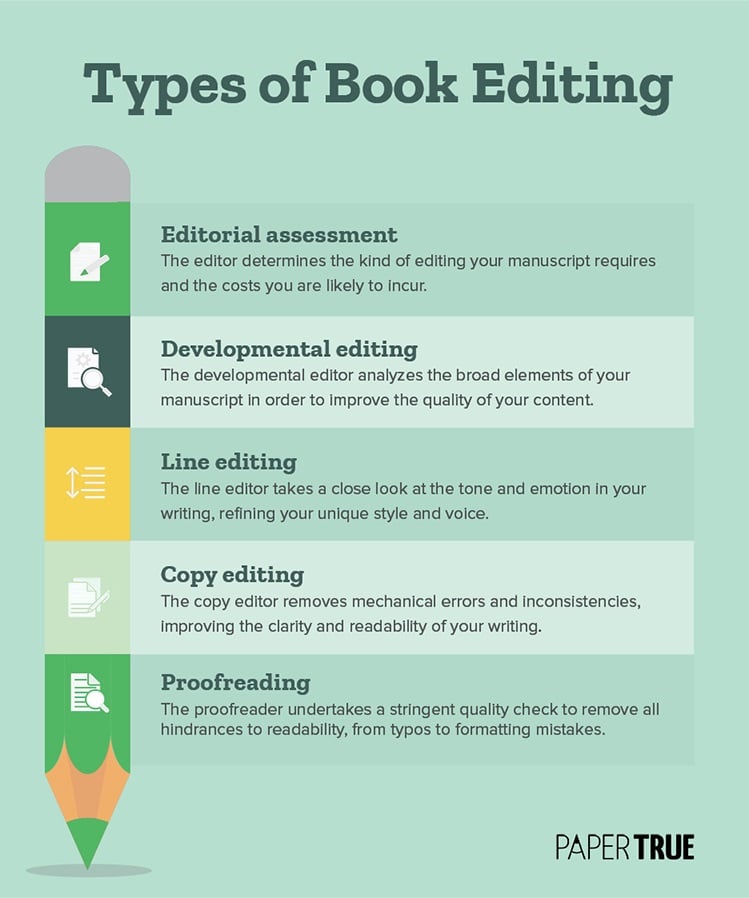
Book editing is a layered process that starts with literary and structural edits and ends with proofreading. Take a look:
Once you have a refined version of your original manuscript, it’s time to get a review or feedback for your writing.
2. Get feedback from beta readers and critique groups
Independent of whether you engage in professional book editing services, receiving insightful feedback is essential to the book publishing process. As you navigate through various stages of manuscript refinement (it’s common for authors to revise several times), circulate your draft among a group of reliable peers for their perspectives.
To encourage candid responses, consider having your beta readers and critique partners use an anonymous feedback form that focuses on key aspects of your writing such as plot, characterization, rhythm, and style. Additionally, guide your reviewers to not only identify areas of concern but also to suggest possible improvements.
3. Decide your mode of publishing
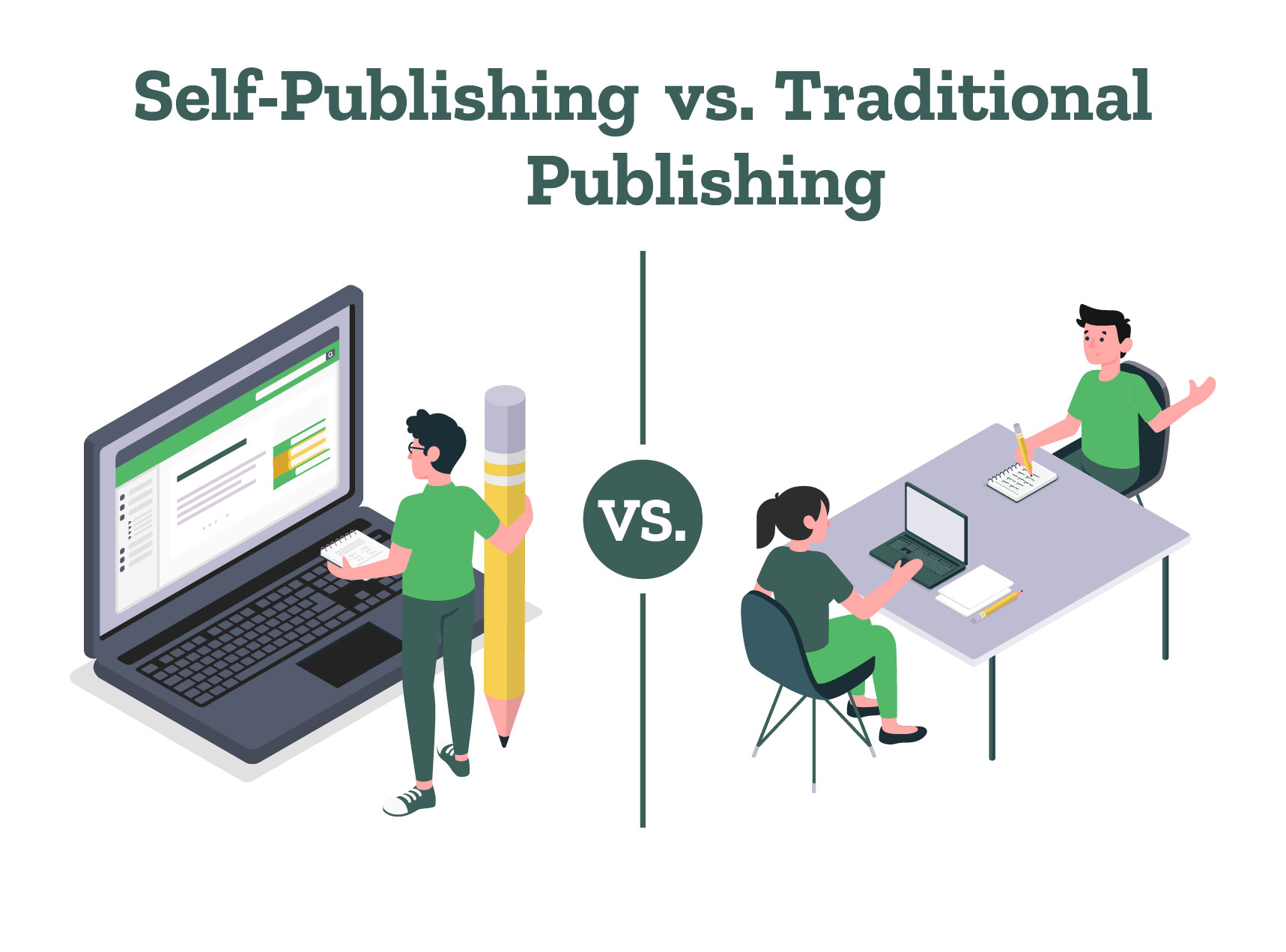
In 2024, there are primarily three routes to publishing: traditional publishing, self-publishing, and hybrid publishing. Traditional publishing involves securing a contract from a publishing house. Self-publishing means you undertake the publishing process independently, while hybrid publishing blends elements of both.
Research the pros and cons of self-publishing vs. traditional publishing to decide which path aligns with your goals and resources and then decide how to publish your own book. If you want to get published traditionally, you should research book publishing companies and literary agents so you can start networking. Self-published writers can instead focus on hiring individuals or services to help them elevate their books.
Regardless of how you select how to publish a book, the steps mentioned below are important for the process.
Formatting a book is the process of laying out your text and graphic elements onto a page. This involves specifics such as the font size and style, text alignment, spacing, and page numbers. A traditional publisher undertakes book typesetting, but writers can still opt for a basic formatting template while sending their manuscript to an agent.
Self-publishing writers, of course, must ensure that their book is professionally formatted according to the print or eBook format of their choice. If you’re only publishing an eBook, you can use one of several free formatting templates available online. The best option is to hire a professional typesetter, but it might increase the cost to publish a book.
If you’re typesetting your book on your own, here are some things to remember:
Use reliable software and templates; try out a few before you choose one.
Select the best page size for your genre. (While publishing a novel, for example, you’re more likely to use the 6×9-inch page setup than the 7×10 one.)
Leave a margin of 0.5 or 1 inch on all sides, especially for print books.
Choose your font based on both aesthetic and readability.
Ensure that your book has an attractive and reader-friendly layout, with well-placed images.
Use well-designed and high-resolution images.
Maintain consistency in your heading style, margin, spacing, and image placement.
Proofread multiple times to root out any formatting errors.
Now that your book’s interior has been designed, it’s time to create a stellar cover. After all, how do you publish a book that sells? By creating an attractive cover design!
5. Design an eye-catching book cover
A book cover design must hook potential readers while also reflecting the book’s theme, style, or mood. This can be achieved through high-quality visuals or inventive typography suitable for your genre. When you’re learning how to publish a novel, for instance, you’ll notice that each subgenre uses a certain color palette and typography.
Romance novels use warm colors and informal typography while fantasy covers use darker shades and intricate, runic typography. Observe the following book cover examples to understand how the design language differs across various genres:
To understand how these decisions play out, you should be familiar with the basic elements of book cover design. Your book cover needs to be professional and polished, so it’s a good idea to hire skilled authors or book designer services. Their expertise can help you create a cover that’s not only well-designed but also marketable.
There are three things to remember when working on your book cover design:
Give your designer an informative and specific brief about your book’s content and your vision for the cover.
Ask for a design that’s suitable for print as well as eBook formats, accounting for thumbnails and grayscale.
If you’re publishing multiple books in the same niche, develop a brand by using a unique visual style or typography. (For example, fantasy author TJ Klune’s book covers share the same visual style or typography, if not both!)
You may have realized by now that branding is an important part of book marketing. Remember that a writing career isn’t just about learning how to publish your book. It’s also about some good old salesmanship!
Don’t be intimidated by the term “metadata”! It is simply a list of details about your book that can help potential readers find it online. Naturally, it plays a crucial role in the publishing and distribution of a book, so you should know the metadata basics.
Here’s a short list of key details that comprise your book’s metadata:
Book title: Create a title that is intriguing and memorable but also captures the essence of your book.
Book description: Summarize your book in simple language, only adding flair where it’s impactful. Incite your readers’ curiosity but don’t forget to account for keywords!
Keywords: Think about the phrases potential readers might google to find your book. Select these key phrases on the publishing platform so it can slot and showcase your book accordingly.
Categories and genre: Choose the appropriate categories and subcategories for your book to help readers easily find it on retail platforms.
BISAC (Book Industry Standards and Communications) code: Select the most fitting BISAC code to help retailers categorize your book by genre and subject matter.
What is the difference between ISBN and BISAC code?
ISBN is a product identifier for books while the BISAC code helps categorize books based on genre. Different editions of the same book will have different ISBNs but the same BISAC code.
All this will take your time, but what about the cost? An important question that authors have is how much does it cost to publish a book. Let’s have a look at how you can decide the pricing of your book.
7. Decide the pricing of your book
Depending on how much does it cost to publish a book, you can decide the pricing of your book. When deciding on the pricing of your book, consider factors such as your book’s genre, length, and target audience, as well as the pricing of similar books in your market. Research what readers are willing to pay for books similar to yours and adjust according to your strategy: higher prices might yield higher returns per sale but could limit the number of overall sales, while lower prices might encourage more readers to take a chance on a new author.
For self-publishing authors, consider the cost of production on different platforms, as these will affect your royalties. It’s also important to think about your long-term goals—are you looking to maximize immediate income, or build a readership? Remember, pricing can always be adjusted over time based on the book’s performance and feedback. Keep an eye on trends and be flexible, adjusting your strategy as needed.
If you engage with online communities throughout the book-writing process, this part will get much easier. This is the time to leverage your mailing list and offer readers exclusive content to generate buzz. If you’ve managed to network with influencers, try to land an interview or two about your upcoming book launch!
Online promotion, however, has its limits. There are few things as powerful as word of mouth! Assemble a team of friends, colleagues, and family members to help you plan the book launch. Ask them to promote your book in their circles, both offline and online. Keep your website or blog busy throughout the launch week, organizing events such as giveaways and writing contests. If you have the numbers, throw a launch party both as a promotional event and to thank people who helped you along the way.
A successful book launch can happen only as a result of months of consistent effort. This may be boring work, but it’ll pay off in the long run!
9. Publish and market your book
Now all that’s left to do is upload your book and metadata on the platforms of your choice. Most self-publishing companies in 2024 have made it fairly easy for writers to publish their books online. All you have to do is upload the file and enter details such as the book title, description, keywords, and categories.
If you’re publishing through various retailers, you can hire an aggregator to handle the task. Their experience with publishing means that you don’t have to second-guess yourself at every turn and can focus on promotional activities instead!
10. Stay Informed and Flexible:
The publishing industry is continually changing. Stay informed about the latest trends, tools, and opportunities. Be prepared to adapt your strategy and take advantage of new technologies or platforms that might help your book succeed.
How long does it take to publish a book?
The time to publish a book varies greatly. Traditional publishing takes 18 months to 3 years after the manuscript is ready, while self-publishing is much faster, often just a few months. Hybrid publishing falls in between these timelines.
Once your book has been published, it’s time to market your book and boost sales. Start by obtaining a good set of reviews on your book. Readers are more likely to entertain books with a decent number of positive reviews, so that’s your baseline for success.
Ideally, the book launch should bolster your social media and blogging efforts. At any rate, continue engaging with your audience and offering them valuable content. Once you reach a certain level of sales, you can run paid ads on Amazon, Facebook, or Goodreads to reach new readers.
Meanwhile, keep working on your next book and repeat the process all over again. Now that you know how to publish your book, we hope the journey ahead will be easier. All the best!
As providers of expert self-publishing services, we love creating useful resources for budding writers. Here are some more of our articles about writing and publishing:
If you’re reading this, chances are you already have a book in the works. You’re almost done with the writing but still can’t decide between traditional publishing and self-publishing, so you wish to compare the pros and cons of both. So, self-publishing vs. traditional publishing: which is better?
Which method earns the most revenue for the author and which method secures your marketing interests? When you compare traditional publishing vs. self-publishing, there are plenty of variables to consider: book rights, creative control, author earnings, time investment, industry trends, and so on.
Let’s dive deeper into the pros and cons of self-publishing vs. traditional publishing and help you select which is better for you.
Start your publishing journey now!
What is self-publishing?
Self-publishing is the act of independently publishing a book, story, or other written content directly by the author, without the involvement of a traditional publishing house. Authors who choose to self-publish take on the roles of both writer and publisher, meaning they are responsible for every aspect of the book’s production, marketing, distribution, and sales. This includes tasks like editing, cover design, formatting, pricing, and promoting the book.
In self-publishing, the writer handles everything. You either learn the skills required to publish a book or hire professionals to manage the services you can’t combat alone. This can include anything from editing and proofreading the manuscript to getting an ISBN or a copyright page. Aside from what you pay these service providers, all the profits from sales belong to you alone. You also retain all publishing rights to the book. Ultimately, you own your book.
Some popular self-publishing companies are Amazon KDP, Apple Books, Barnes & Noble Press, Rakuten Kobo, and Draft2Digital.
What is traditional publishing?
Traditional publishing refers to the conventional method of getting a book published where an author partners with an established publishing house. When it comes to traditional publishing vs. self-publishing, the more popular or widely known way of publishing is traditional publishing. In this process, the publisher takes care of the various stages of producing, distributing, and marketing the book. Typically, the author submits a manuscript or proposal to the publisher, who then decides whether to accept it based on its potential for commercial success.
In traditional publishing, the publisher handles all publishing-related activities. In exchange for these services, you sell them the publishing rights to your book. Along with this, the publisher also owns all the profits from the book sales. Basically, the publisher owns the book.
Some popular traditional book publishing companies are Penguin Random House, Harper Collins, Simon and Schuster, Macmillan Publishers, and Hachette Book Group.
After understanding what traditional vs. self-publishing is, we need to know what is the difference between self-publishing and traditional publishing.
What is the difference between self-publishing and traditional publishing?
Getting to know self-publishing vs. traditional publishing pros and cons makes learning about their difference easier for us.
Pros of self-publishing
1. Creative control:
You determine the look and style of your book. You aren’t answerable to anyone and need not make any unnecessary sacrifices. It is easier to appeal to niche audiences and build a readership for your aesthetic.
2. Rights and royalties:
You own all publishing rights and most of your earnings.
3. Marketing Control:
You can create blogs, be active on Goodreads, and establish an author brand to market the book effectively. You’re free to market according to your convenience: offer discounts, partner with other businesses, or promote your own.
4. Profits:
The long-term earnings of self-published authors are more than those of the traditionally published ones. This is because as a self-published writer, you own your book and all your royalties.
5. Fast to publish:
Since no gatekeepers are involved, books dealing in niche areas and first-time writers find it much easier to get published this way. It takes only a few days or weeks for you to self-publish a book!
Cons of self-publishing
1. Personal investment:
It’s a lot of work to self-publish, even if you hire professional help. The writer is personally involved every step of the way since you have to make sure that the book is perfect.
2. Time investment:
It can take some time for a writer to master all the different skills that self-publishing requires. Some authors like being self-sufficient and enjoy the challenge this process presents, but it’s not for everyone.
3. Cost:
Professional help is required at some stage or the other if only to ensure that the book reads well and looks great. Depending on how much you outsource, this can cost anything between $100-$5000. You can either invest a lot of time into doing everything yourself or you can hire experienced service providers who will achieve the same goal.
A deal with a reputed publisher means well for your status in the publishing world. It sends a signal of quality to readers and guarantees the value of your book. This also means attention from mainstream media outlets, which works wonders for your author’s brand.
2. Hassle-free:
The publisher covers all professional services, so you don’t have to lift a finger. Professionals with industry experience handle everything and you are free to, well, write.
3. Advance:
You get paid before the book gets published. This is an added plus in case the book doesn’t sell well enough, since you don’t have to pay anything back!
4. Bookstore placement:
Traditional publishers have a strong distribution network. They make sure to place your book in physical bookstores, which increases your chances of selling your book.
Publishers and agents are flooded with book proposals daily, so they reach out to very few writers. New writers especially find nothing in traditional publishing but a string of rejections.
2. No creative control:
Once the contract is signed, the publishers have full rights to edit and market the book as they wish. You get a very limited say in how your book is designed, promoted, and sold in the market.
3. No marketing control:
All publishers today rely on writers to market and sell their books, but don’t allow them to decide on book marketing strategies.
4. No ownership:
In giving up the publishing rights of the book, you’re also giving up your intellectual property. In case the book becomes popular in another venture like movies or video games, you won’t be able to earn from it.
5. Low earnings:
The low royalty rates of 7-10% do not measure up to the profits earned from the 50–70% royalty rates in self-publishing.
6. Time investment:
On top of the time spent trying to get selected by agents and publishers, traditional publishing typically takes a year or two to publish a book. In an age where Amazon can publish the same book in a matter of hours and you can start earning in 60 days, this is a big drawback for traditional publishing.
7. Complicated contracts:
Publishing contracts are complicated documents that almost always favor the publisher. You need to go through these carefully and get help from lawyers to retain as many of the book’s rights as you can.
Now that we’ve seen the pros and cons of self-publishing vs. traditional publishing, the differences between them are evident. Now the question that arises is what will work for you, self-publishing or traditional publishing?
Now that we’ve seen the pros and cons of self-publishing vs. traditional publishing, the differences between them are evident. Now the question that arises is what will work for you, self-publishing or traditional publishing?
Traditional publishing vs. self-publishing: which method should I go for?
At the end of the day, the answer to this depends on what is more important to you, traditional vs. self-publishing. Do you, as a writer, value creative control and ownership, or is status more important to you? Traditional publishing and self-publishing both have different and valuable things to offer.
We’ve prepared a table that may help make things easy:
We hope that you are clear about what is self-publishing vs. traditional publishing, and ready to make your choice!
As expert providers of self-publishing services, we love to curate publishing resources for you. In case you want to read a bit more before making your decision, you can check out the following articles:
Get carefully curated resources about writing, editing, and publishing in the comfort of your inbox.
[contact-form-7 id="12723" title="Subscribe Form"]
How to Copyright Your Book?
If you’ve thought about copyrighting your book, you’re on the right path.
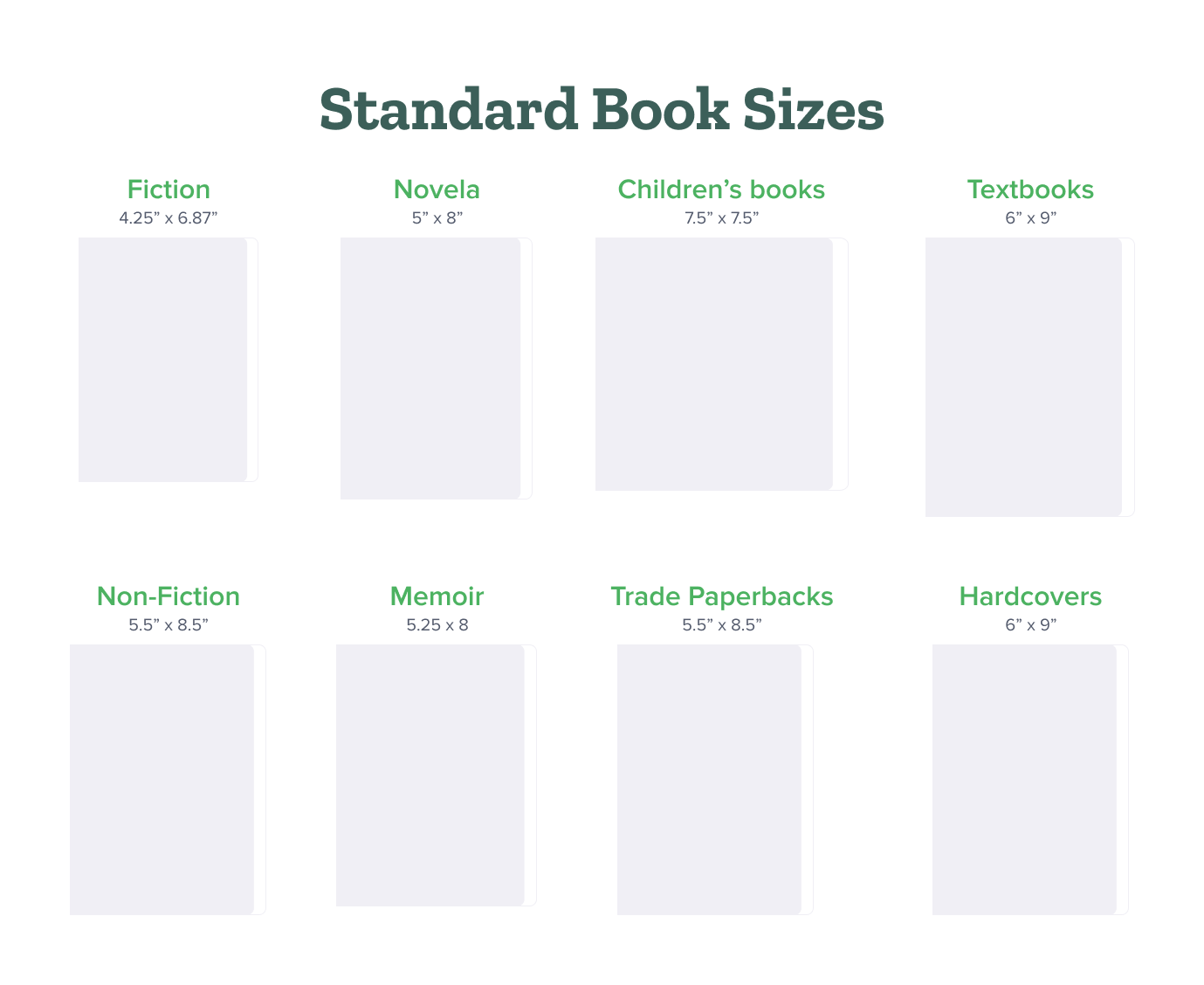
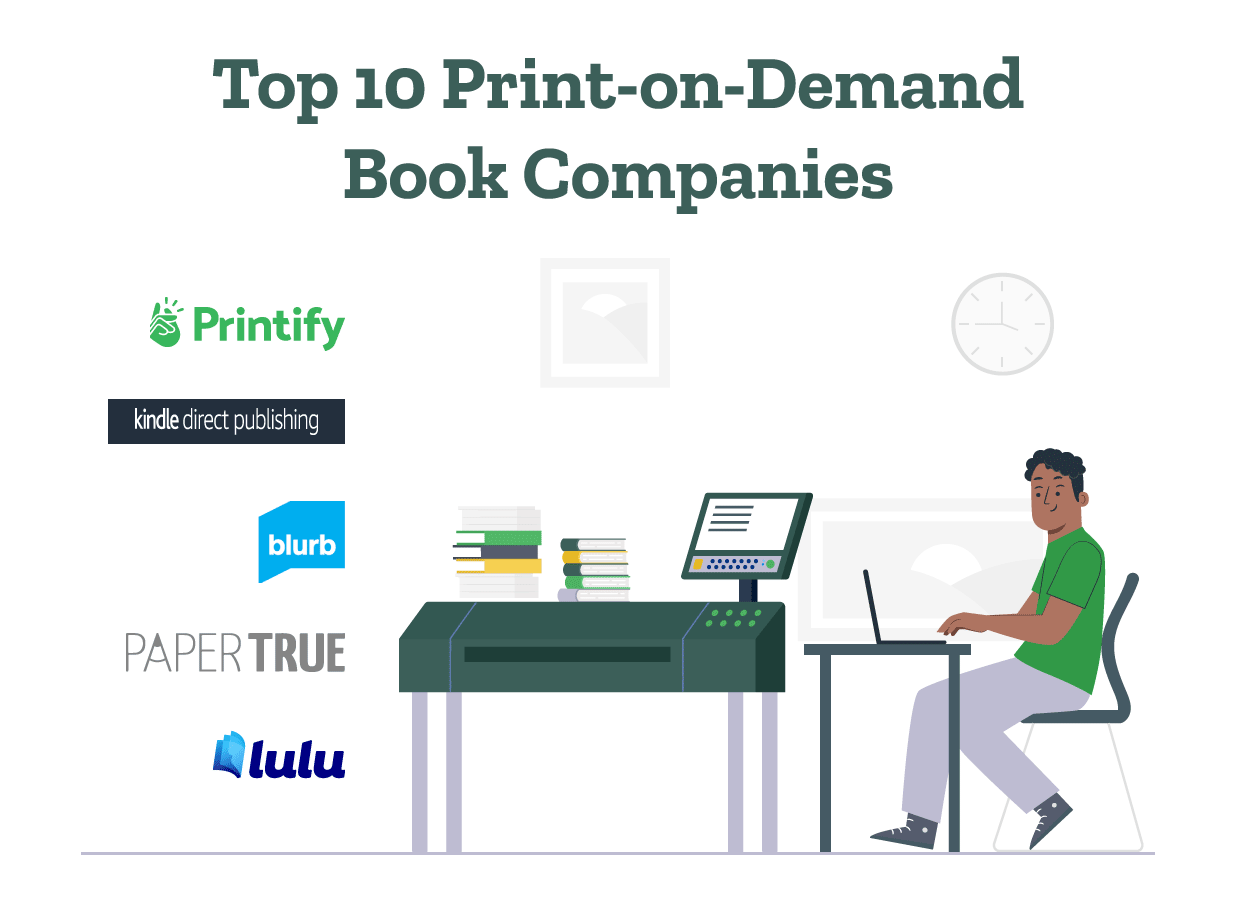
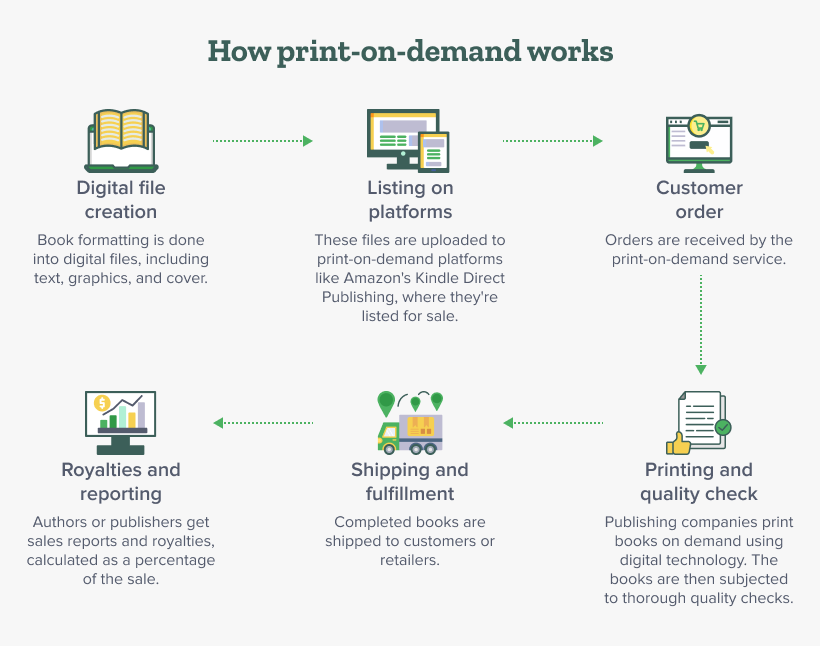
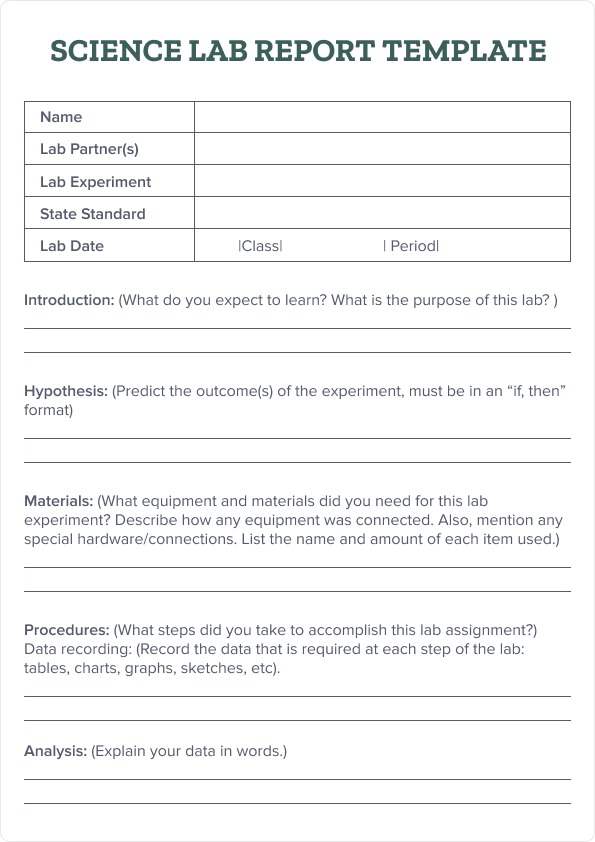
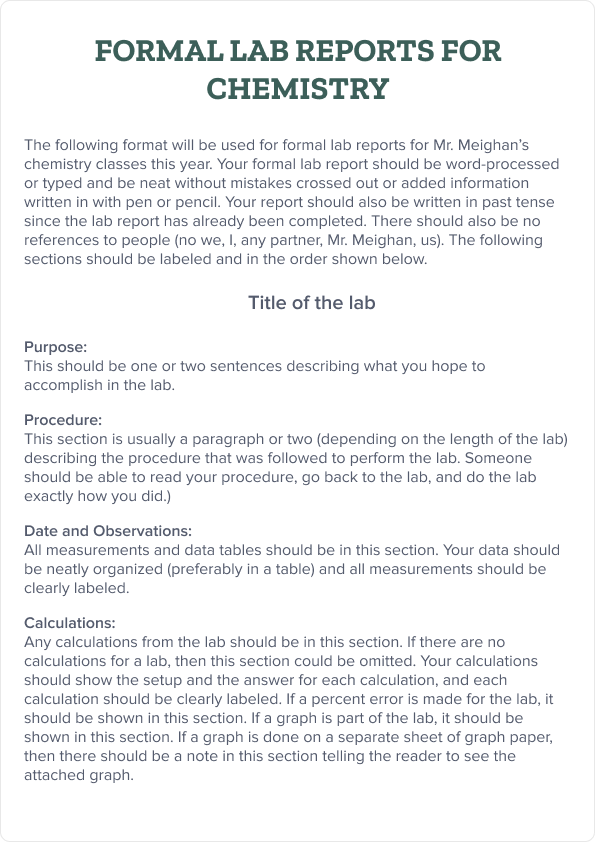
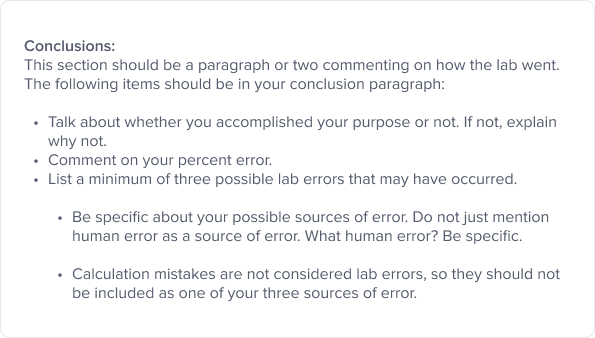
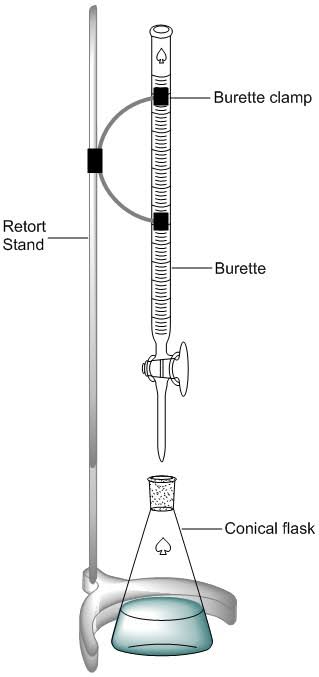
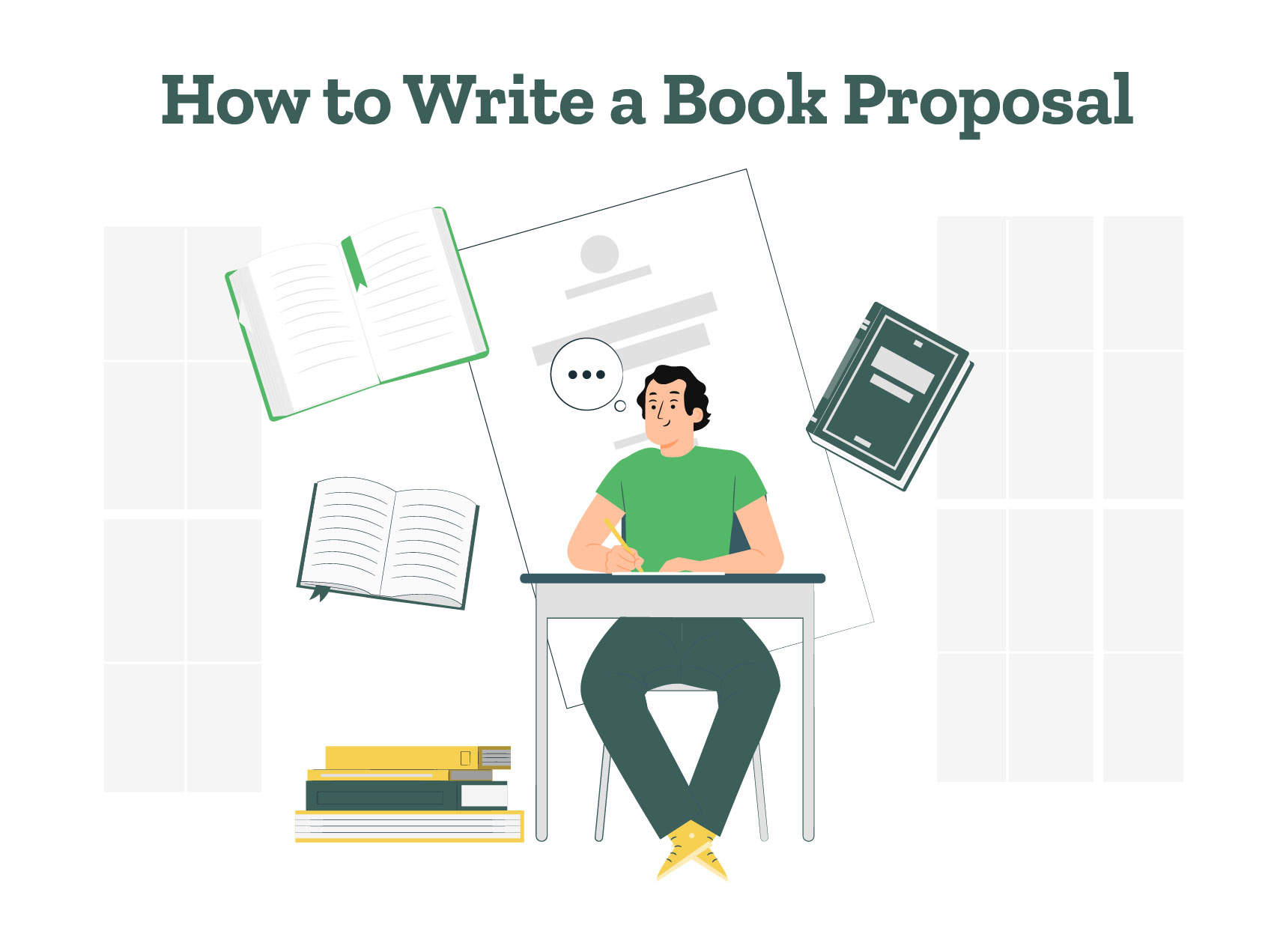
![How to Publish a Book on Amazon: 8 Easy Steps [2024 Update]](https://www.papertrue.com/blog/wp-content/uploads/2024/01/How_to_Publish_a_Book_on_Amazon.jpg)