- A List of Writing Contests in 2022 | Exciting Prizes!
- Em Dash vs. En Dash vs. Hyphen: When to Use Which
- Book Proofreading 101: The Beginner’s Guide
- Screenplay Editing: Importance, Cost, & Self-Editing Tips
- Screenplay Proofreading: Importance, Process, & Cost
- Script Proofreading: Rates, Process, & Proofreading Tips
- Manuscript Proofreading | Definition, Process & Standard Rates
- Tips to Write Better if English Is Your Second Language
- Novel Proofreading | Definition, Significance & Standard Rates
- Top 10 Must-Try Writing Prompt Generators in 2024
- 100+ Creative Writing Prompts for Masterful Storytelling
- Top 10 eBook Creator Tools in 2024: Free & Paid
- 50 Timeless and Unforgettable Book Covers of All Time
- What Is Flash Fiction? Definition, Examples & Types
- 80 Enchanting Christmas Writing Prompts for Your Next Story
- Your Guide to the Best eBook Readers in 2024
- Top 10 Book Review Clubs of 2025 to Share Literary Insights
- 2024’s Top 10 Self-Help Books for Better Living
- Writing Contests 2023: Cash Prizes, Free Entries, & More!
- What Is a Book Teaser and How to Write It: Tips and Examples
- Audiobook vs. EBook vs. Paperback in 2024: (Pros & Cons)
- How to Get a Literary Agent in 2024: The Complete Guide
- Alpha Readers: Where to Find Them and Alpha vs. Beta Readers
- Author Branding 101: How to Build a Powerful Author Brand
- A Guide on How to Write a Book Synopsis: Steps and Examples
- How to Write a Book Review (Meaning, Tips & Examples)
- 50 Best Literary Agents in the USA for Authors in 2024
- Building an Author Website: The Ultimate Guide with Examples
- Top 10 Paraphrasing Tools for All (Free & Paid)
- Top 10 Book Editing Software in 2024 (Free & Paid)
- What Are Large Language Models and How They Work: Explained!
- Top 10 Hardcover Book Printing Services [Best of 2024]
- 2024’s Top 10 Setting Generators to Create Unique Settings
- Different Types of Characters in Stories That Steal the Show
- Top 10 Screenplay & Scriptwriting Software (Free & Paid)
- 10 Best AI Text Generators of 2024: Pros, Cons, and Prices
- Top 10 Must-Try Character Name Generators in 2024
- 10 Best AI Text Summarizers in 2024 (Free & Paid)
- 2024’s 10 Best Punctuation Checkers for Error-Free Text
- 11 Best Story Structures for Writers (+ Examples!)
- How to Write a Book with AI in 2024 (Free & Paid Tools)
- Writing Contests 2024: Cash Prizes & Free Entries!
- Patchwork Plagiarism: Definition, Types, & Examples
- Simple Resume Formats for Maximum Impact With Samples
- What Is a Complement in a Sentence? (Meaning, Types & Examples)
- What are Clauses? Definition, Meaning, Types, and Examples
- Persuasive Writing Guide: Techniques & Examples
- How to Paraphrase a Text (Examples + 10 Strategies!)
- A Simple Proofreading Checklist to Catch Every Mistake
- Top 10 AI Resume Checkers for Job Seekers (Free & Paid)
- 20 Best Comic Book Covers of All Time!
- How to Edit a Book: A Practical Guide with 7 Easy Steps
- How to Write an Autobiography (7 Amazing Strategies!)
- How to Publish a Comic Book: Nine Steps & Publishing Costs
- Passive and Active Voice (Meaning, Examples & Uses)
- How to Publish a Short Story & Best Publishing Platforms
- What Is Expository Writing? Types, Examples, & 10 Tips
- 10 Best Introduction Generators (Includes Free AI Tools!)
- Creative Writing: A Beginner’s Guide to Get Started
- How to Sell Books Online (Steps, Best Platforms & Tools)
- Top 10 Book Promotion Services for Authors (2025)
- 15 Different Types of Poems: Examples & Insight into Poetic Styles
- 10 Best Book Writing Apps for Writers 2025: Free & Paid!
- Top 10 AI Humanizers of 2025 [Free & Paid Tools]
- How to Write a Poem: Step-by-Step Guide to Writing Poetry
- 100+ Amazing Short Story Ideas to Craft Unforgettable Stories
- The Top 10 Literary Devices: Definitions & Examples
- Top 10 AI Translators for High-Quality Translation in 2025
- Top 10 AI Tools for Research in 2025 (Fast & Efficient!)
- 50 Best Essay Prompts for College Students in 2025
- Top 10 Book Distribution Services for Authors in 2025
- Best 101 Greatest Fictional Characters of All Time
- Top 10 Book Title Generators of 2025
- Best Fonts and Sizes for Books: A Complete Guide
- What Is an Adjective? Definition, Usage & Examples
- How to Track Changes in Google Docs: A 7-Step Guide
- Best Book Review Sites of 2025: Top 10 Picks
- Parts of a Book: A Practical, Easy-to-Understand Guide
- What Is an Anthology? Meaning, Types, & Anthology Examples
- How to Write a Book Report | Steps, Examples & Free Template
- 10 Best Plot Generators for Engaging Storytelling in 2025
- 30 Powerful Poems About Life to Inspire and Uplift You
- What Is a Poem? Poetry Definition, Elements, & Examples
- Metonymy: Definition, Examples, and How to Use It In Writing
- How to Write a CV with AI in 9 Steps (+ AI CV Builders)
- What Is an Adverb? Definition, Types, & Practical Examples
- How to Create the Perfect Book Trailer for Free
- Top 10 Book Publishing Companies in 2025
- 14 Punctuation Marks: A Guide on How to Use with Examples!
- Translation Services: Top 10 Professional Translators (2025)
- 10 Best Free Online Grammar Checkers: Features and Ratings
- 30 Popular Children’s Books Teachers Recommend in 2025
- 10 Best Photobook Makers of 2025 We Tested This Year
- Top 10 Book Marketing Services of 2025: Features and Costs
- Top 10 Book Printing Services for Authors in 2025
- 10 Best AI Detector Tools in 2025
- Audiobook Marketing Guide: Best Strategies, Tools & Ideas
- 10 Best AI Writing Assistants of 2025 (Features + Pricing)
- How to Write a Book Press Release that Grabs Attention
- 15 Powerful Writing Techniques for Authors in 2025
- Generative AI: Types, Impact, Advantages, Disadvantages
- Top 101 Bone-Chilling Horror Writing Prompts
- 25 Figures of Speech Simplified: Definitions and Examples
- Top 10 AI Rewriters for Perfect Text in 2025 (Free & Paid)
- Best EBook Cover Design Services of 2025 for Authors
- Writing Contests 2025: Cash Prizes, Free Entries, and More!
- Top 10 Book Writing Software, Websites, and Tools in 2025
- National Novel Writing Month (NaNoWriMo)
- Best Horror Books of All Time (Must-Read List)
- Best Book Trailer Services
- What is a Book Copyright Page?
- Final Checklist: Is My Article Ready for Submitting to Journals?
- 8 Pre-Publishing Steps to Self-Publish Your Book
- 7 Essential Elements of a Book Cover Design
- How to Copyright Your Book in the US, UK, & India
- Beta Readers: Why You Should Know About Them in 2024
- How to Publish a Book in 2024: Essential Tips for Beginners
- Book Cover Design Basics: Tips & Best Book Cover Ideas
- Why and How to Use an Author Pen Name: Guide for Authors
- How to Format a Book in 2025: 7 Tips for Book Formatting
- What is Manuscript Critique? Benefits, Process, & Cost
- 10 Best Ghostwriting Services for Authors in 2025
- ISBN Guide 2025: What Is an ISBN and How to Get an ISBN
- Best Manuscript Editing Services of 2025
- How to Hire a Book Editor in 5 Practical Steps
- Self-Publishing Options for Writers
- How to Promote Your Book Using a Goodreads Author Page
- 7 Essential Elements of a Book Cover Design
- What Makes Typesetting a Pre-Publishing Essential for Every Author?
- 4 Online Publishing Platforms To Boost Your Readership
- Typesetting: An Introduction
- Quick Guide to Novel Editing (with a Self-Editing Checklist)
- Self-Publishing vs. Traditional Publishing: 2024 Guide
- How to Publish a Book in 2024: Essential Tips for Beginners
- How to Publish a Book on Amazon: 8 Easy Steps [2024 Update]
- What are Print-on-Demand Books? Cost and Process in 2024
- What Are the Standard Book Sizes for Publishing Your Book?
- How to Market Your Book on Amazon to Maximize Sales in 2024
- Top 10 Hardcover Book Printing Services [Best of 2024]
- How to Find an Editor for Your Book in 8 Steps (+ Costs!)
- What Is Amazon Self-Publishing? Pros, Cons & Key Insights
- Manuscript Editing in 2024: Elevating Your Writing for Success
- Know Everything About How to Make an Audiobook
- A Simple 14-Point Self-Publishing Checklist for Authors
- How to Write an Engaging Author Bio: Tips and Examples
- Book Cover Design Basics: Tips & Best Book Cover Ideas
- How to Publish a Comic Book: Nine Steps & Publishing Costs
- Why and How to Use an Author Pen Name: Guide for Authors
- How to Sell Books Online (Steps, Best Platforms & Tools)
- A Simple Guide to Select the Best Self-Publishing Websites
- 10 Best Book Cover Design Services of 2025: Price & Ratings
- How Much Does It Cost to Self-Publish a Book in 2025?
- Quick Guide to Book Editing [Complete Process & Standard Rates]
- How to Distinguish Between Genuine and Fake Literary Agents
- What is Self-Publishing? Everything You Need to Know
- How to Copyright a Book in 2025 (Costs + Free Template)
- The Best eBook Conversion Services of 2025: Top 10 Picks
- 10 Best Self-Publishing Companies of 2025: Price & Royalties
- 10 Best Photobook Makers of 2025 We Tested This Year
- Book Cover Types: Formats, Bindings & Styles
- ISBN Guide 2025: What Is an ISBN and How to Get an ISBN
- A Beginner’s Guide on How to Self Publish a Book (2025)
- Index in a Book: Definition, Purpose, and How to Use It
- How to Publish a Novel: Easy Step-By-Step Guide
- How to start your own online publishing company?
- 8 Tips To Write Appealing Query Letters
- Self-Publishing vs. Traditional Publishing: 2024 Guide
- How to Publish a Book in 2024: Essential Tips for Beginners
- What are Print-on-Demand Books? Cost and Process in 2024
- How to Write a Query Letter (Examples + Free Template)
- Third-person Point of View: Definition, Types, Examples
- How to Write an Engaging Author Bio: Tips and Examples
- How to Publish a Comic Book: Nine Steps & Publishing Costs
- Top 10 Book Publishing Companies in 2025
- 10 Best Photobook Makers of 2025 We Tested This Year
- Book Cover Types: Formats, Bindings & Styles
- ISBN Guide 2025: What Is an ISBN and How to Get an ISBN
- Index in a Book: Definition, Purpose, and How to Use It
- How to Publish a Novel: Easy Step-By-Step Guide
- How to Create Depth in Characters
- Starting Your Book With a Bang: Ways to Catch Readers’ Attention
- Research for Fiction Writers: A Complete Guide
- Short stories: Do’s and don’ts
- How to Write Dialogue: 7 Rules, 5 Tips & 65 Examples
- What Are Foil and Stock Characters? Easy Examples from Harry Potter
- How To Write Better Letters In Your Novel
- On Being Tense About Tense: What Verb Tense To Write Your Novel In
- How To Create A Stellar Plot Outline
- How to Punctuate Dialogue in Fiction
- On Being Tense about Tense: Present Tense Narratives in Novels
- The Essential Guide to Worldbuilding [from Book Editors]
- What Is Point of View? Definition, Types, & Examples in Writing
- How to Create Powerful Conflict in Your Story | Useful Examples
- How to Write a Book: A Step-by-Step Guide
- How to Write a Short Story in 6 Simple Steps
- How to Write a Novel: 8 Steps to Help You Start Writing
- What Is a Stock Character? 150 Examples from 5 Genres
- Joseph Campbell’s Hero’s Journey: Worksheet & Examples
- Novel Outline: A Proven Blueprint [+ Free Template!]
- Character Development: 7-Step Guide for Writers
- What Is NaNoWriMo? Top 7 Tips to Ace the Writing Marathon
- What Is the Setting of a Story? Meaning + 7 Expert Tips
- What Is a Blurb? Meaning, Examples & 10 Expert Tips
- What Is Show, Don’t Tell? (Meaning, Examples & 6 Tips)
- How to Write a Book Summary: Example, Tips, & Bonus Section
- How to Write a Book Description (Examples + Free Template)
- 10 Best Free AI Resume Builders to Create the Perfect CV
- A Complete Guide on How to Use ChatGPT to Write a Resume
- 10 Best AI Writer Tools Every Writer Should Know About
- How to Write a Book Title (15 Expert Tips + Examples)
- 100 Novel and Book Ideas to Start Your Book Writing Journey
- Exploring Writing Styles: Meaning, Types, and Examples
- Mastering Professional Email Writing: Steps, Tips & Examples
- How to Write a Screenplay: Expert Tips, Steps, and Examples
- Business Proposal Guide: How to Write, Examples and Template
- Different Types of Resumes: Explained with Tips and Examples
- How to Create a Memorable Protagonist (7 Expert Tips)
- How to Write an Antagonist (Examples & 7 Expert Tips)
- Writing for the Web: 7 Expert Tips for Web Content Writing
- 10 Best AI Text Generators of 2024: Pros, Cons, and Prices
- What are the Parts of a Sentence? An Easy-to-Learn Guide
- What Is Climax Of A Story & How To Craft A Gripping Climax
- What Is a Subject of a Sentence? Meaning, Examples & Types
- Object of a Sentence: Your Comprehensive Guide
- What Is First-Person Point of View? Tips & Practical Examples
- Second-person Point of View: What Is It and Examples
- 10 Best AI Essay Outline Generators of 2024
- Third-person Point of View: Definition, Types, Examples
- The Importance of Proofreading: A Comprehensive Overview
- Patchwork Plagiarism: Definition, Types, & Examples
- Simple Resume Formats for Maximum Impact With Samples
- The Ultimate Guide to Phrases In English – Types & Examples
- Modifiers: Definition, Meaning, Types, and Examples
- What are Clauses? Definition, Meaning, Types, and Examples
- Persuasive Writing Guide: Techniques & Examples
- What Is a Simile? Meaning, Examples & How to Use Similes
- Mastering Metaphors: Definition, Types, and Examples
- How to Publish a Comic Book: Nine Steps & Publishing Costs
- Essential Grammar Rules: Master Basic & Advanced Writing Skills
- Benefits of Using an AI Writing Generator for Editing
- Hyperbole in Writing: Definition and Examples
- 15 Best ATS-Friendly ChatGPT Prompts for Resumes in 2025
- How to Write a Novel in Past Tense? 3 Steps & Examples
- 10 Best Spell Checkers of 2025: Features, Accuracy & Ranking
- Foil Character: Definition, History, & Examples
- 5 Key Elements of a Short Story: Essential Tips for Writers
- How to Write a Children’s Book: An Easy Step-by-Step Guide
- How To Write a Murder Mystery Story
- What Is an Adjective? Definition, Usage & Examples
- Metonymy: Definition, Examples, and How to Use It In Writing
- Fourth-Person Point of View: A Unique Narrative Guide
- How to Write a CV with AI in 9 Steps (+ AI CV Builders)
- What Is an Adverb? Definition, Types, & Practical Examples
- How to Write A Legal Document in 6 Easy Steps
- 10 Best AI Story Generators in 2025: Write Captivating Tales
- How to Introduce a Character Effectively
- What is Rhetoric and How to Use It in Your Writing
- How to Write a Powerful Plot in 12 Steps
- How to Make Money as a Writer: Your First $1,000 Guide
- How to Write SEO Content: Tips for SEO-Optimized Content
- Types of Introductions and Examples
- What is a Cliffhanger? Definition, Examples, & Writing Tips
- How to Write Cliffhangers that Keep Readers Hooked!
- How to Write a Romance Novel: Step-by-Step Guide
- Top 10 Writing Tips from Famous Authors
- 10 Best Ghostwriting Services for Authors in 2025
- What is Ghostwriting? Meaning and Examples
- How to Become a Ghostwriter: Complete Career Guide
- How to Write a Speech that Inspires (With Examples)
- Theme of a Story | Meaning, Common Themes & Examples
- 10 Best AI Writing Assistants of 2025 (Features + Pricing)
- Generative AI: Types, Impact, Advantages, Disadvantages
- Worldbuilding Questions and Templates (Free)
- How to Avoid Plagiarism in 2025 (10 Effective Strategies!)
- How to Create Marketing Material
- What Is Worldbuilding? Steps, Tips, and Examples
- How to Avoid AI Detection in 2025 (6 Proven Techniques!)
- What is Syntax in Writing: Definition and Examples
- What is a Subplot? Meaning, Examples & Types
- Writing Challenges Every Writer Should Take
- What Is a Memoir? Definition, Examples, and Tips
- What Is Fiction? Definition, Types & Examples
Still have questions? Leave a comment
Checklist: Dissertation Proposal
Enter your email id to get the downloadable right in your inbox!
[contact-form-7 id="12425" title="Checklist: Dissertation Proposal"]
Examples: Edited Papers
Enter your email id to get the downloadable right in your inbox!
[contact-form-7 id="12426" title="Examples: Edited Papers"]Looking
to self-publish
your book?
Index in a Book: Definition, Purpose, and How to Use It
 Nov 20, 2025
 9
min read
9
min read
Hello Readers and Writers!
Have you ever flipped through a nonfiction book, looking for that one topic you remember reading, but couldn’t find? Or perhaps you’re an author preparing your manuscript and wondering how to make your book easier to navigate and more professional. If yes, then we’ve got you right!
In this guide, we’ll walk you through everything you need to know to make your book reader-friendly and credible, from what an index is, how indexes improve usability and reader experience, to their types, structure, and even the costs involved in creating one.
Don’t let indexing slow down your publishing process. Ask the experts! Get Started
What is an index in a book?
A book’s index is an alphabetical list of the important words, subjects, people, places, and ideas included in it, with page numbers indicating where they are referred to. An index helps readers quickly locate information without reading the entire text.
In this guide, you’ll learn what an index is, where it’s found, its types, its purpose, and even how much it costs to create one.
Index vs table of contents vs glossary
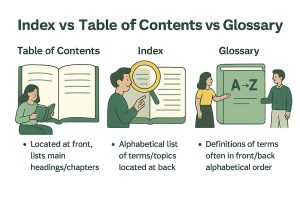
Readers can effectively navigate a book by comprehending these elements:
Table of Contents (ToC): Found at the beginning of most books, the ToC outlines their structure by listing chapters or sections alphabetically, serving as a roadmap of their organization.
Index: At the back of every book lies an alphabetized listing of topics, terms, and names mentioned within it, together with page references where these appear in greater depth. This allows readers to quickly access detailed information on any particular subject of their choosing.
Glossary: Commonly found at the back of a book, glossaries provide definitions to complex or technical terms used throughout the text and help readers better comprehend specific terminology.
Where is an index found in a book?
Indexes are traditionally located near the end of books, after sections like bibliographies and glossaries have been presented. It is used to ensure readers can quickly locate them after finishing the main content. Such placement provides convenient access for readers after having finished with their reading material.
What are the functions of indices in books?
How an index helps readers quickly access information
An index provides readers with an organized summary of a book‘s content, making it easy for them to quickly locate specific information. Instead of skimming chapters for answers they want, readers can refer to an index in search of exact pages where topics of interest have been discussed.
Why indexes boost credibility and sales (nonfiction)
An impressive index enhances a nonfiction work’s professionalism and utility by showing thoroughness. It also increases credibility with readers searching for reliable information sources. A well-constructed index also has potential appeal to those readers seeking quick, convenient information sources.
Do short or simple books need an index?
While shorter books don’t necessitate extensive indices, having one may still prove beneficial. An index provides quick navigation between topics or serves as an easy reference guide, especially important features in nonfiction works with few pages to cover!
Types of book indexes
Back-of-Book index (BoB index)
Back-of-Book (BoB) indexes are one of the most frequent types, typically located at the end of a book. They list topics alphabetically with associated page numbers to provide a comprehensive view of their content and facilitate quick navigation of bookshelves.
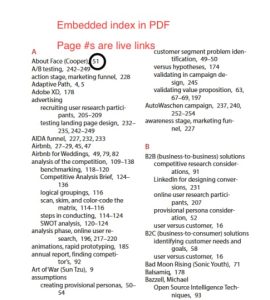
Embedded index for eBooks
Indexes in ebooks feature clickable links that lead readers directly to specific sections or pages, providing convenience and interactivity while at the same time being compatible across devices and platforms. However, to achieve maximum compatibility, they require careful formatting so as to be compatible across devices and platforms.
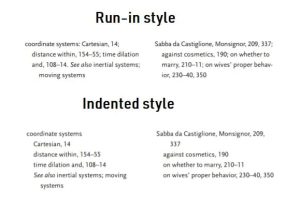
Indented vs. run-in formatting
Indented Index: An indented index lists entries with subentries listed directly beneath their primary entry for easier scanning and finding.
Example
Dragons
Fire-breathing techniques, 103–105
Habitat, 45–47
Run-In Index: Entries and subentries are presented in a continuous line, which can save space but may be harder to read.
Example
Dragons: Fire-breathing techniques, 103–105; Habitat, 45–47
How to search an index in a book (reader tips)
Reading Entries, Subentries, Ranges, and Cross-References
- Entries: Main topics listed alphabetically.
- Subentries: Indented items providing more detail under the main entry.
- Ranges: Page numbers indicating where the topic is discussed.
- Cross-References: Directions to related topics, often marked as “See” or “See also.”
Practical Example Lookup (Walkthrough)
To find information on “dragons” in a book:
- Turn to the index at the end of the book.
- Locate “Dragons” in the alphabetical list.
- Note the page numbers listed next to the entry.
- Refer to those pages in the main text for detailed information.
Common mistakes readers make (and How to avoid them)
Overlooking subentries: Many readers only look at main topics, skipping the indented subentries that often provide more detail or material that is more germane to the issue at hand.
How to Avoid:
- Always look under the main entry for subtopics that are indented.
- Subentries usually refer to examples, persons, or main discussions that are secondary to the primary focus of the discussion.
- If you are doing focused research, the subentries are time savers, taking you directly to the precise issue you are interested in.
Avoiding cross-references: Cross-references act as links to associated concepts or alternative words. Failure to follow the links can lead to the absence of significant relationships in the text.
How to Avoid:
- If you come to “See” or “See also,” do not disregard it as “off topic.” Instead, go to the suggested entry.
- Cross-references are like leads; more often than not, they connect wider topics or the same topics discussed under different titles.
- For research or studying the topic, it is important to have cross-references for richer content on the topic.
Misinterpreting page ranges: Some individuals consider page ranges, for example, 45 to 50, as boundaries that are only the first or last page stated, while in the actual sense, the whole range is the topic under discussion.
How to Avoid:
- Focus on all of the listed pages so as to get the whole argument.
- Scan through the section and look for subheadings, cases, or illustrations that elaborate on the topic.
- With books that have heavy texts, try to use a range of pages to locate multiple mentions of the same concept, rather than aiming for isolated mentions.
How to build an index (workflow & roles)
When indexing occurs in publishing (timing and version control)
Indexing typically happens after the manuscript has been finalized but before going to print. This ensures that all relevant content is included and referenced accurately.
Why did professional indexers outshine auto-generated lists?
Professional indexers possess extensive expertise in selecting relevant terms and organizing them logically, unlike automated tools, which merely extract terms without providing context or satisfying readers’ needs effectively.
DIY vs. hiring a professional
Creating your own index may seem simple, but it often misses consistency. For example, you might list “Cars” and “Vehicles” separately, while a professional would link them. Professionals ensure clarity, accuracy, and easy navigation for readers.
Step-by-Step indexing process
1. Defining audience terms and synonyms
Determine what terms your target audience might search for and look into synonyms and related concepts to ensure comprehensive coverage.
2. Identify pertinent topics vs trivial mentions
Focus your indexing efforts on indexing significant topics that further the book’s purpose; avoid trivial mentions that do not add anything of value for readers.
3. Create headings, subentries, and cross-references
Maintain an organized index with clear headings and subentries, cross-references to lead readers quickly to relevant topics, and subindexes as needed.
4. Tools indexers use (specialized software) and why this matters
Indexers often utilize software programs such as Cindex or SkyIndex in order to efficiently create and manage indexes, maintaining consistent and accurate processes in indexing processes. Such tools help ensure consistency throughout this step in indexing processes.
Costs and timelines to expect (What to anticipate)
Typical indexable page pricing (BoB vs Embedded)
Pricing depends on the type of index and its content complexity; back-of-book indexes usually cost less due to their simpler formatting than embedded indexes.
Time of turnaround and scheduling an indexer
Turnaround times depend upon the complexity and scale of a project; to ensure timely completion, it’s wise to schedule your indexer well in advance.
Budget tips for authors and small publishers
- Plan early: To reduce last-minute stress and save yourself the extra cost associated with indexing, set aside enough time and budget early in your publishing process for indexing. Communicate with both editors and designers so page numbers can be finalized prior to indexing beginning; budget 5-10% of total costs towards this stage for planning purposes.
- Explore DIY indexing: For short or straightforward books, it can be worthwhile creating a basic index on your own using tools such as Microsoft Word’s Indexing feature, Cindex, or PDF Index Generator. Organize key terms alphabetically before double-checking page references to ensure accuracy. Anything better than no index is certainly better!
- Choose professionals wisely: To achieve polished and accurate results for long or complex books, consider employing the services of professional book formatters or indexers if funds permit; look for certified experts, review samples provided by these indexers, and clarify pricing (typically $3-$6 per page). Alternatively, outsource key chapters while continuing the rest yourself.
Quality checklist: what to consider in an effective index
1. Accuracy, consistency, and reader-centric language
Assure all entries are accurate, consistent, and written using language that meets reader expectations.
2. Coverage of concepts not named in the text
An effective index should anticipate topics readers might search for even when these terms don’t explicitly appear in the text.
How to recognize an index that doesn’t perform well?
Format inconsistent entries: Entries should adhere to a consistent format from start to finish.
Cross-reference issues: Failure to include cross-references can make it hard for readers to locate related material quickly and easily.
Overly deliberate entries: Entries should be concise and pertinent; avoid unnecessary details.
In this guide, you’ll learn what an index is, where it’s found, its types, its purpose, and even how much it costs to create one.
A well-crafted index is more than a back-of-book formality; it’s a bridge between your content and your readers. It improves usability, adds credibility, and makes your work truly professional. Whether you’re self-publishing your first book or preparing a complex nonfiction manuscript, understanding how to build (or commission) a great index is an essential skill.
We hope this guide clarified everything you need to know about book indexes. PaperTrue’s professional book editors and publishing experts can help make your book accurate, polished, and ready for global readers.
Publishing your own book? Read these articles to get more information: