- A List of Writing Contests in 2022 | Exciting Prizes!
- Em Dash vs. En Dash vs. Hyphen: When to Use Which
- Book Proofreading 101: The Beginner’s Guide
- Screenplay Editing: Importance, Cost, & Self-Editing Tips
- Screenplay Proofreading: Importance, Process, & Cost
- Script Proofreading: Rates, Process, & Proofreading Tips
- Manuscript Proofreading | Definition, Process & Standard Rates
- Tips to Write Better if English Is Your Second Language
- Novel Proofreading | Definition, Significance & Standard Rates
- Top 10 Must-Try Writing Prompt Generators in 2024
- 100+ Creative Writing Prompts for Masterful Storytelling
- Top 10 eBook Creator Tools in 2024: Free & Paid
- 50 Timeless and Unforgettable Book Covers of All Time
- What Is Flash Fiction? Definition, Examples & Types
- 80 Enchanting Christmas Writing Prompts for Your Next Story
- Top 10 Book Review Clubs of 2025 to Share Literary Insights
- 2024’s Top 10 Self-Help Books for Better Living
- Writing Contests 2023: Cash Prizes, Free Entries, & More!
- What Is a Book Teaser and How to Write It: Tips and Examples
- Audiobook vs. EBook vs. Paperback in 2024: (Pros & Cons)
- How to Get a Literary Agent in 2024: The Complete Guide
- Alpha Readers: Where to Find Them and Alpha vs. Beta Readers
- Author Branding 101: How to Build a Powerful Author Brand
- A Guide on How to Write a Book Synopsis: Steps and Examples
- How to Write a Book Review (Meaning, Tips & Examples)
- 50 Best Literary Agents in the USA for Authors in 2024
- Building an Author Website: The Ultimate Guide with Examples
- Top 10 Paraphrasing Tools for All (Free & Paid)
- Top 10 Book Editing Software in 2024 (Free & Paid)
- What Are Large Language Models and How They Work: Explained!
- Top 10 Hardcover Book Printing Services [Best of 2024]
- 2024’s Top 10 Setting Generators to Create Unique Settings
- Different Types of Characters in Stories That Steal the Show
- Top 10 Screenplay & Scriptwriting Software (Free & Paid)
- 10 Best AI Text Generators of 2024: Pros, Cons, and Prices
- Top 10 Must-Try Character Name Generators in 2024
- 10 Best AI Text Summarizers in 2024 (Free & Paid)
- 11 Best Story Structures for Writers (+ Examples!)
- How to Write a Book with AI in 2024 (Free & Paid Tools)
- Writing Contests 2024: Cash Prizes & Free Entries!
- Patchwork Plagiarism: Definition, Types, & Examples
- Simple Resume Formats for Maximum Impact With Samples
- What Is a Complement in a Sentence? (Meaning, Types & Examples)
- What are Clauses? Definition, Meaning, Types, and Examples
- Persuasive Writing Guide: Techniques & Examples
- How to Paraphrase a Text (Examples + 10 Strategies!)
- A Simple Proofreading Checklist to Catch Every Mistake
- Top 10 AI Resume Checkers for Job Seekers (Free & Paid)
- 20 Best Comic Book Covers of All Time!
- How to Edit a Book: A Practical Guide with 7 Easy Steps
- How to Write an Autobiography (7 Amazing Strategies!)
- How to Publish a Comic Book: Nine Steps & Publishing Costs
- Passive and Active Voice (Meaning, Examples & Uses)
- How to Publish a Short Story & Best Publishing Platforms
- What Is Expository Writing? Types, Examples, & 10 Tips
- 10 Best Introduction Generators (Includes Free AI Tools!)
- Creative Writing: A Beginner’s Guide to Get Started
- How to Sell Books Online (Steps, Best Platforms & Tools)
- Top 10 Book Promotion Services for Authors (2025)
- 15 Different Types of Poems: Examples & Insight into Poetic Styles
- 10 Best Book Writing Apps for Writers 2025: Free & Paid!
- Top 10 AI Humanizers of 2025 [Free & Paid Tools]
- How to Write a Poem: Step-by-Step Guide to Writing Poetry
- 100+ Amazing Short Story Ideas to Craft Unforgettable Stories
- The Top 10 Literary Devices: Definitions & Examples
- Top 10 AI Translators for High-Quality Translation in 2025
- Top 10 AI Tools for Research in 2025 (Fast & Efficient!)
- 50 Best Essay Prompts for College Students in 2025
- Top 10 Book Distribution Services for Authors in 2025
- Top 10 Book Title Generators of 2025
- What Is an Adjective? Definition, Usage & Examples
- How to Track Changes in Google Docs: A 7-Step Guide
- Best Book Review Sites of 2025: Top 10 Picks
- Parts of a Book: A Practical, Easy-to-Understand Guide
- What Is an Anthology? Meaning, Types, & Anthology Examples
- How to Write a Book Report | Steps, Examples & Free Template
- 10 Best Plot Generators for Engaging Storytelling in 2025
- 30 Powerful Poems About Life to Inspire and Uplift You
- What Is a Poem? Poetry Definition, Elements, & Examples
- Metonymy: Definition, Examples, and How to Use It In Writing
- How to Write a CV with AI in 9 Steps (+ AI CV Builders)
- What Is an Adverb? Definition, Types, & Practical Examples
- How to Create the Perfect Book Trailer for Free
- 14 Punctuation Marks: A Guide on How to Use with Examples!
- Translation Services: Top 10 Professional Translators (2025)
- 10 Best Free Online Grammar Checkers: Features and Ratings
- 30 Popular Children’s Books Teachers Recommend in 2025
- 10 Best Photobook Makers of 2025 We Tested This Year
- Top 10 Book Marketing Services of 2025: Features and Costs
- Top 10 Book Printing Services for Authors in 2025
- 10 Best AI Detector Tools in 2025
- Audiobook Marketing Guide: Best Strategies, Tools & Ideas
- 10 Best AI Writing Assistants of 2025 (Features + Pricing)
- How to Write a Book Press Release that Grabs Attention
- 15 Powerful Writing Techniques for Authors in 2025
- Generative AI: Types, Impact, Advantages, Disadvantages
- Top 101 Bone-Chilling Horror Writing Prompts
- 25 Figures of Speech Simplified: Definitions and Examples
- Best EBook Cover Design Services of 2025 for Authors
- Writing Contests 2025: Cash Prizes, Free Entries, and More!
- National Novel Writing Month (NaNoWriMo)
- Best Horror Books of All Time (Must-Read List)
- Best Book Trailer Services
- Your Guide to the Best eBook Readers in 2026
- 10 Best Punctuation Checkers for Error-Free Text (2026)
- Master Circumlocution: Definition, Examples & Literary Uses
- Best Historical Fiction Books: 30 Must-Read Novels
- Best 101 Greatest Fictional Characters of All Time
- Writing Contests 2026: Free Entries and Cash Prizes!
- Top 10 Book Writing Software, Websites, and Tools in 2026
- Top 10 AI Rewriters for Perfect Text in 2026 (Free & Paid)
- Top 10 Book Publishing Companies in the World (2026)
- Best Fonts and Sizes for Books: A Complete Guide
- What is a Book Copyright Page?
- Final Checklist: Is My Article Ready for Submitting to Journals?
- 8 Pre-Publishing Steps to Self-Publish Your Book
- 7 Essential Elements of a Book Cover Design
- How to Copyright Your Book in the US, UK, & India
- Beta Readers: Why You Should Know About Them in 2024
- How to Publish a Book in 2024: Essential Tips for Beginners
- Book Cover Design Basics: Tips & Best Book Cover Ideas
- Why and How to Use an Author Pen Name: Guide for Authors
- How to Format a Book in 2025: 7 Tips for Book Formatting
- What is Manuscript Critique? Benefits, Process, & Cost
- 10 Best Ghostwriting Services for Authors in 2025
- Best Manuscript Editing Services of 2025
- Best Manuscript Critique Services (2026): Top 10 Picks
- How To Format a Book in Google Docs (Step-by-Step)
- ISBN Guide: What Is an ISBN and How to Get an ISBN
- How to Hire a Book Editor in 5 Practical Steps
- Self-Publishing Options for Writers
- How to Promote Your Book Using a Goodreads Author Page
- 7 Essential Elements of a Book Cover Design
- What Makes Typesetting a Pre-Publishing Essential for Every Author?
- 4 Online Publishing Platforms To Boost Your Readership
- Typesetting: An Introduction
- Quick Guide to Novel Editing (with a Self-Editing Checklist)
- Self-Publishing vs. Traditional Publishing: 2024 Guide
- How to Publish a Book in 2024: Essential Tips for Beginners
- How to Publish a Book on Amazon: 8 Easy Steps [2024 Update]
- What are Print-on-Demand Books? Cost and Process in 2024
- What Are the Standard Book Sizes for Publishing Your Book?
- How to Market Your Book on Amazon to Maximize Sales in 2024
- Top 10 Hardcover Book Printing Services [Best of 2024]
- How to Find an Editor for Your Book in 8 Steps (+ Costs!)
- What Is Amazon Self-Publishing? Pros, Cons & Key Insights
- Manuscript Editing in 2024: Elevating Your Writing for Success
- Know Everything About How to Make an Audiobook
- A Simple 14-Point Self-Publishing Checklist for Authors
- How to Write an Engaging Author Bio: Tips and Examples
- Book Cover Design Basics: Tips & Best Book Cover Ideas
- How to Publish a Comic Book: Nine Steps & Publishing Costs
- Why and How to Use an Author Pen Name: Guide for Authors
- How to Sell Books Online (Steps, Best Platforms & Tools)
- A Simple Guide to Select the Best Self-Publishing Websites
- 10 Best Book Cover Design Services of 2025: Price & Ratings
- How Much Does It Cost to Self-Publish a Book in 2025?
- Quick Guide to Book Editing [Complete Process & Standard Rates]
- How to Distinguish Between Genuine and Fake Literary Agents
- What is Self-Publishing? Everything You Need to Know
- How to Copyright a Book in 2025 (Costs + Free Template)
- The Best eBook Conversion Services of 2025: Top 10 Picks
- 10 Best Self-Publishing Companies of 2025: Price & Royalties
- 10 Best Photobook Makers of 2025 We Tested This Year
- Book Cover Types: Formats, Bindings & Styles
- A Beginner’s Guide on How to Self Publish a Book (2025)
- Index in a Book: Definition, Purpose, and How to Use It
- How to Publish a Novel: Easy Step-By-Step Guide
- How to Design a Book Cover: From Concept to Covers That Sell
- ISBN Guide: What Is an ISBN and How to Get an ISBN
- 8 Tips To Write Appealing Query Letters
- Self-Publishing vs. Traditional Publishing: 2024 Guide
- How to Publish a Book in 2024: Essential Tips for Beginners
- What are Print-on-Demand Books? Cost and Process in 2024
- How to Write a Query Letter (Examples + Free Template)
- Third-person Point of View: Definition, Types, Examples
- How to Write an Engaging Author Bio: Tips and Examples
- How to Publish a Comic Book: Nine Steps & Publishing Costs
- 10 Best Photobook Makers of 2025 We Tested This Year
- Book Cover Types: Formats, Bindings & Styles
- Index in a Book: Definition, Purpose, and How to Use It
- How to Publish a Novel: Easy Step-By-Step Guide
- How to start your own online publishing company?
- How to Design a Book Cover: From Concept to Covers That Sell
- ISBN Guide: What Is an ISBN and How to Get an ISBN
- Top 10 Book Publishing Companies in the World (2026)
- How to Create Depth in Characters
- Starting Your Book With a Bang: Ways to Catch Readers’ Attention
- Research for Fiction Writers: A Complete Guide
- Short stories: Do’s and don’ts
- How to Write Dialogue: 7 Rules, 5 Tips & 65 Examples
- What Are Foil and Stock Characters? Easy Examples from Harry Potter
- How To Write Better Letters In Your Novel
- On Being Tense About Tense: What Verb Tense To Write Your Novel In
- How To Create A Stellar Plot Outline
- How to Punctuate Dialogue in Fiction
- On Being Tense about Tense: Present Tense Narratives in Novels
- The Essential Guide to Worldbuilding [from Book Editors]
- What Is Point of View? Definition, Types, & Examples in Writing
- How to Create Powerful Conflict in Your Story | Useful Examples
- How to Write a Book: A Step-by-Step Guide
- How to Write a Short Story in 6 Simple Steps
- How to Write a Novel: 8 Steps to Help You Start Writing
- What Is a Stock Character? 150 Examples from 5 Genres
- Joseph Campbell’s Hero’s Journey: Worksheet & Examples
- Novel Outline: A Proven Blueprint [+ Free Template!]
- Character Development: 7-Step Guide for Writers
- What Is NaNoWriMo? Top 7 Tips to Ace the Writing Marathon
- What Is the Setting of a Story? Meaning + 7 Expert Tips
- What Is a Blurb? Meaning, Examples & 10 Expert Tips
- What Is Show, Don’t Tell? (Meaning, Examples & 6 Tips)
- How to Write a Book Summary: Example, Tips, & Bonus Section
- How to Write a Book Description (Examples + Free Template)
- 10 Best Free AI Resume Builders to Create the Perfect CV
- A Complete Guide on How to Use ChatGPT to Write a Resume
- 10 Best AI Writer Tools Every Writer Should Know About
- How to Write a Book Title (15 Expert Tips + Examples)
- 100 Novel and Book Ideas to Start Your Book Writing Journey
- Exploring Writing Styles: Meaning, Types, and Examples
- Mastering Professional Email Writing: Steps, Tips & Examples
- How to Write a Screenplay: Expert Tips, Steps, and Examples
- Business Proposal Guide: How to Write, Examples and Template
- Different Types of Resumes: Explained with Tips and Examples
- How to Create a Memorable Protagonist (7 Expert Tips)
- How to Write an Antagonist (Examples & 7 Expert Tips)
- Writing for the Web: 7 Expert Tips for Web Content Writing
- 10 Best AI Text Generators of 2024: Pros, Cons, and Prices
- What are the Parts of a Sentence? An Easy-to-Learn Guide
- What Is Climax Of A Story & How To Craft A Gripping Climax
- What Is a Subject of a Sentence? Meaning, Examples & Types
- Object of a Sentence: Your Comprehensive Guide
- What Is First-Person Point of View? Tips & Practical Examples
- Second-person Point of View: What Is It and Examples
- 10 Best AI Essay Outline Generators of 2024
- Third-person Point of View: Definition, Types, Examples
- The Importance of Proofreading: A Comprehensive Overview
- Patchwork Plagiarism: Definition, Types, & Examples
- Simple Resume Formats for Maximum Impact With Samples
- The Ultimate Guide to Phrases In English – Types & Examples
- Modifiers: Definition, Meaning, Types, and Examples
- What are Clauses? Definition, Meaning, Types, and Examples
- Persuasive Writing Guide: Techniques & Examples
- What Is a Simile? Meaning, Examples & How to Use Similes
- Mastering Metaphors: Definition, Types, and Examples
- How to Publish a Comic Book: Nine Steps & Publishing Costs
- Essential Grammar Rules: Master Basic & Advanced Writing Skills
- Benefits of Using an AI Writing Generator for Editing
- Hyperbole in Writing: Definition and Examples
- 15 Best ATS-Friendly ChatGPT Prompts for Resumes in 2025
- How to Write a Novel in Past Tense? 3 Steps & Examples
- 10 Best Spell Checkers of 2025: Features, Accuracy & Ranking
- Foil Character: Definition, History, & Examples
- How to Write a Children’s Book: An Easy Step-by-Step Guide
- How To Write a Murder Mystery Story
- What Is an Adjective? Definition, Usage & Examples
- Metonymy: Definition, Examples, and How to Use It In Writing
- Fourth-Person Point of View: A Unique Narrative Guide
- How to Write a CV with AI in 9 Steps (+ AI CV Builders)
- What Is an Adverb? Definition, Types, & Practical Examples
- How to Write A Legal Document in 6 Easy Steps
- 10 Best AI Story Generators in 2025: Write Captivating Tales
- How to Introduce a Character Effectively
- What is Rhetoric and How to Use It in Your Writing
- How to Write a Powerful Plot in 12 Steps
- How to Make Money as a Writer: Your First $1,000 Guide
- How to Write SEO Content: Tips for SEO-Optimized Content
- Types of Introductions and Examples
- What is a Cliffhanger? Definition, Examples, & Writing Tips
- How to Write Cliffhangers that Keep Readers Hooked!
- How to Write a Romance Novel: Step-by-Step Guide
- Top 10 Writing Tips from Famous Authors
- 10 Best Ghostwriting Services for Authors in 2025
- What is Ghostwriting? Meaning and Examples
- How to Become a Ghostwriter: Complete Career Guide
- How to Write a Speech that Inspires (With Examples)
- Theme of a Story | Meaning, Common Themes & Examples
- 10 Best AI Writing Assistants of 2025 (Features + Pricing)
- Generative AI: Types, Impact, Advantages, Disadvantages
- Worldbuilding Questions and Templates (Free)
- How to Avoid Plagiarism in 2025 (10 Effective Strategies!)
- How to Create Marketing Material
- What Is Worldbuilding? Steps, Tips, and Examples
- What is Syntax in Writing: Definition and Examples
- What is a Subplot? Meaning, Examples & Types
- Writing Challenges Every Writer Should Take
- What Is a Memoir? Definition, Examples, and Tips
- What Is Fiction? Definition, Types & Examples
- What Is Science Fiction? Meaning, Examples, and Types
- 50 Character Stereotypes: The Ultimate List!
- 50 Novel Writing Prompts (Categorized by Genre)
- 50 Haiku Writing Prompts For Your Inner Poet
- Direct Characterization: Definition, Examples & Comparison
- Indirect Characterization: Meaning, Examples & Writing Tips
- Direct vs Indirect Characterization: What’s the Difference
- How to Write Epic Fantasy
- 50 Non-fiction Writing Prompts For Your Inner Writer
- Master Circumlocution: Definition, Examples & Literary Uses
- How to Write a Good Villain (With Examples)
- How to Avoid AI Detection in 2026 (6 Proven Techniques!)
- How to Write a Cookbook: Step-by-Step Guide
- 5 Key Elements of a Short Story: Essential Tips for Writers
Still have questions? Leave a comment
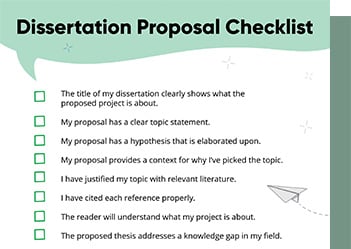
Checklist: Dissertation Proposal
Enter your email id to get the downloadable right in your inbox!
[contact-form-7 id="12425" title="Checklist: Dissertation Proposal"]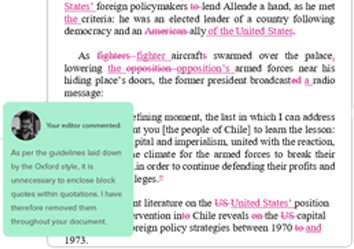
Examples: Edited Papers
Enter your email id to get the downloadable right in your inbox!
[contact-form-7 id="12426" title="Examples: Edited Papers"]Looking
to self-publish
your book?
How to Design a Book Cover: From Concept to Covers That Sell
 Feb 02, 2026
 5
min read
5
min read
A book cover is the first thing a reader sees and often the reason they decide to click, pick up, or scroll past a book. That’s why learning how to design a book cover is essential for authors, students, and self-publishers alike. A well-designed cover instantly communicates the genre, tone, and promise of your story, even before a single word is read.
Whether you’re designing a cover for a novel, children’s book, comic, fantasy title, or a school project, understanding the basics of book cover design helps your book stand out in a crowded market.
Get The Best Book Cover For Your Story Now! Learn More
In this guide, you’ll learn practical, step-by-step methods, tools, and tips to create a book cover that looks professional and attracts the right readers.
How to design a good book cover (The core principles)
Before opening any design software, understand these fundamentals:
Step 1: Understand the goal (it’s not just art)
Before you open any software, remember: How to design a good book cover isn’t about illustrating every scene in your book. It’s about signaling the genre.
- The “Vibe” Check: A thriller should look tense (high contrast, dark colors). A romance should feel warm (soft pastels, cursive fonts).
- Thumbnail Test: Most books are discovered online. If your design doesn’t work at the size of a postage stamp, it won’t work on Amazon.
Step 2: Know your genre
If you want to know how to design a cover for a book that resonates, look at the bestsellers in your category.
Every genre has visual expectations:
- Romance → soft colors, emotional imagery
- Fantasy → dramatic typography, magical elements
- Children’s books → bright colors, friendly illustrations
- Comics → bold fonts, high contrast
Readers subconsciously judge genre in under 3 seconds.
Step 3: The 3 pillars of design
- Imagery: Pick one focal point. For a fantasy book cover, this might be a single glowing sword or a mysterious castle. Avoid “mega-montages” that clutter the space.
- Typography: The title is the hero. Ensure it has high contrast against the background. For a cover of a novel, the author’s name is usually at the bottom, while for a school project cover, the title takes center stage.
- Color Palette: Stick to a 2 or 3-color scheme. High-contrast colors (like teal and orange) are eye-catching, while monochromatic schemes feel sophisticated.
How to design a cover for a book (step-by-step)
1. Define your book’s message
Ask:
- Who is this book for?
- What emotion should the cover evoke?
- What promise does the book make?
Write this in one sentence before designing.
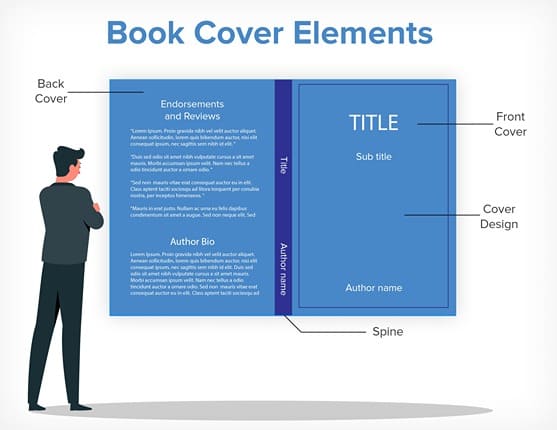
2. Choose the right size
Standard book cover dimensions vary by platform (Amazon, IngramSpark). Always design using:
- Front cover
- Spine
- Back cover (for print)
3. Select imagery
You can use:
- Custom illustrations
- Stock photos
- Abstract graphics
- Typography-only designs
Make sure images are high resolution (300 DPI) for print.
How to design a book cover online (easy tools)
If you don’t use professional software, online tools work well:
- Canva – beginner-friendly, great templates
- BookBrush – designed specifically for authors
- Adobe Express – clean layouts with flexibility
How to design a book cover in Photoshop
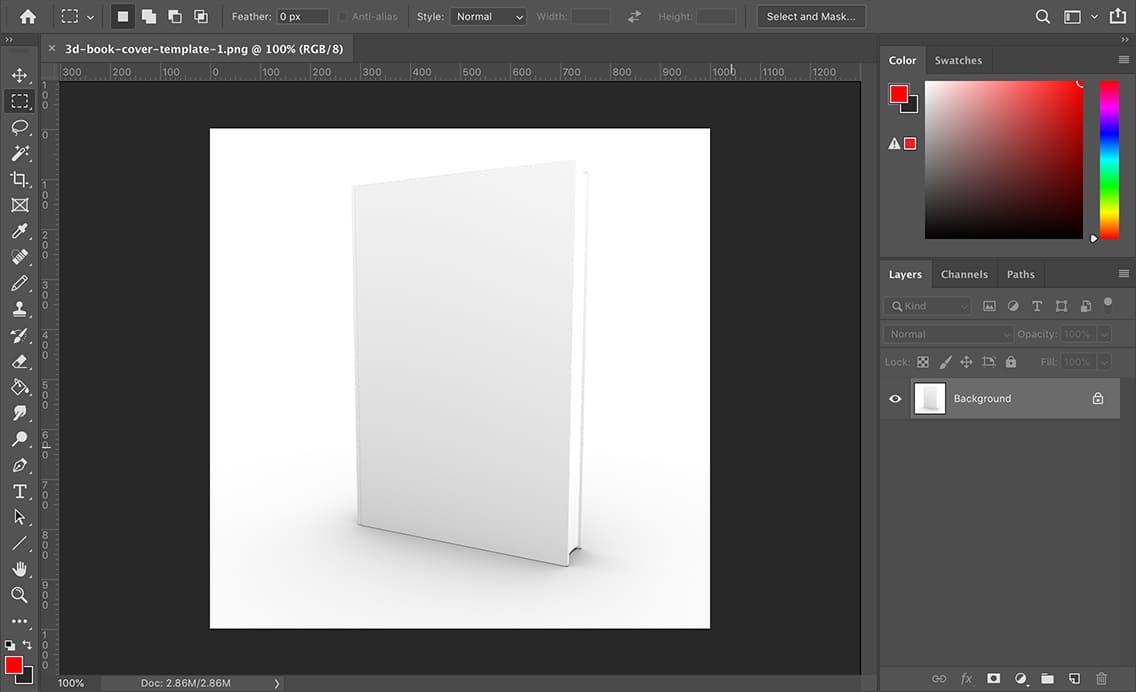
For professionals, Photoshop is the gold standard. It allows for advanced “layering”—blending a character into a background while adding lighting effects (like a subtle glow behind the head) to make the title pop.
These platforms are ideal for quick, professional results.
How to make a book cover design for different book types
How to design a book cover for a novel
- Focus on mood and theme
- Use symbolic imagery
- Let typography set the tone
How to design a fantasy book cover
- Use dramatic lighting and colors
Include magical or mythical elements - Choose bold, cinematic fonts
How to design a children’s book cover
- Bright colors and playful illustrations
- Friendly characters
- Large, readable fonts
How to design a comic book cover
- High contrast visuals
- Dynamic poses
- Bold, attention-grabbing text
How to design a book cover for a school project
- Keep it clean and simple
- Use clear titles
- Avoid overcrowding visuals
Common book cover design mistakes to avoid
Even a great story can struggle if the cover sends the wrong signals. Below are the most common book cover design mistakes and exactly how to avoid them.
1. Using low-resolution images
Low-resolution images appear blurry or pixelated, especially in print. This instantly makes your book look unprofessional and cheap, even if the content is high quality.
Tips to fix it:
- Always use images that are 300 DPI for print covers
- Avoid screenshots or images taken from Google
- Use stock photo sites or custom illustrations meant for commercial use
- Zoom in to 100% if it looks fuzzy; don’t use it
Pro tip: If an image looks “okay” on screen but blurry when zoomed, it will look worse in print.
2. Overloading the cover with text
Too much text overwhelms the reader and removes visual focus. Readers should understand the book in seconds, not struggle to read paragraphs on the cover.
Tips to fix it:
- Stick to three main elements: title, author name, and optional subtitle
- Move the extra text to the back cover
- Use spacing and hierarchy to guide the eye
- Ask: Can this be understood in 3 seconds?
Rule of thumb: If you need to squint or zoom to read it, there’s too much text.
3. Ignoring genre conventions
Readers rely on covers to instantly identify genre. If your cover doesn’t match expectations, your book may be ignored even if it’s great.
Examples:
A romance novel with a dark thriller-style cover
A fantasy book without any sense of magic or scale
Tips to fix it:
- Study the top 10 bestsellers in your genre
- Note common colors, fonts, and imagery
- Match expectations before trying to stand out
4. Poor font readability
If readers can’t read your title instantly, they won’t click. Decorative fonts often look attractive but fail at small sizes.
Common mistakes:
- Thin script fonts
- Overly decorative typography
- Poor contrast between text and background
Tips to fix it:
- Test fonts at thumbnail size
- Use high-contrast text (light on dark or vice versa)
- Limit yourself to one or two book fonts
- Choose book fonts that match the book’s tone
Quick test: If the title isn’t readable at phone size, change the font.
5. Designing without thumbnail preview
Most readers first see your book as a tiny image on Amazon or mobile screens. A cover that looks great full-size may fail as a thumbnail.
Tips to fix it:
- Shrink your cover to 100–200 pixels wide
- Check if the title and main image are still clear
- Remove unnecessary details that disappear at small sizes
- Test on phone screens
6. Always test your cover at small sizes
Your cover must work everywhere, including ebooks, ads, social media, and search results.
Practical testing checklist:
- View it on mobile
- View it as a grayscale image
- Zoom out to thumbnail size
- Ask others what genre they think it is
If people can’t tell the genre or title instantly, revise.
Designing a book cover isn’t just about making something look attractive; it’s about telling a visual story that connects with your target audience. When you understand how to design a good book cover, choose the right imagery, follow genre conventions, and use readable typography, your cover becomes a powerful marketing tool.
Whether you’re using online tools, designing in Photoshop, or creating a cover for a school project, applying these principles will help your book look polished and credible. With the right approach, even beginners can create a book cover that grabs attention, builds trust, and invites readers to open the book.
Taking professional help from expert book cover design services like PaperTrue will help you go from good to best!
Here are some more resources: